
Recurring events often share the same race structure and award configuration. Race Roster allows races to be duplicated from a previous event, with the option to include eligible awards during the duplication process.
See also: How to Create and Assign Awards
Duplicate races and awards
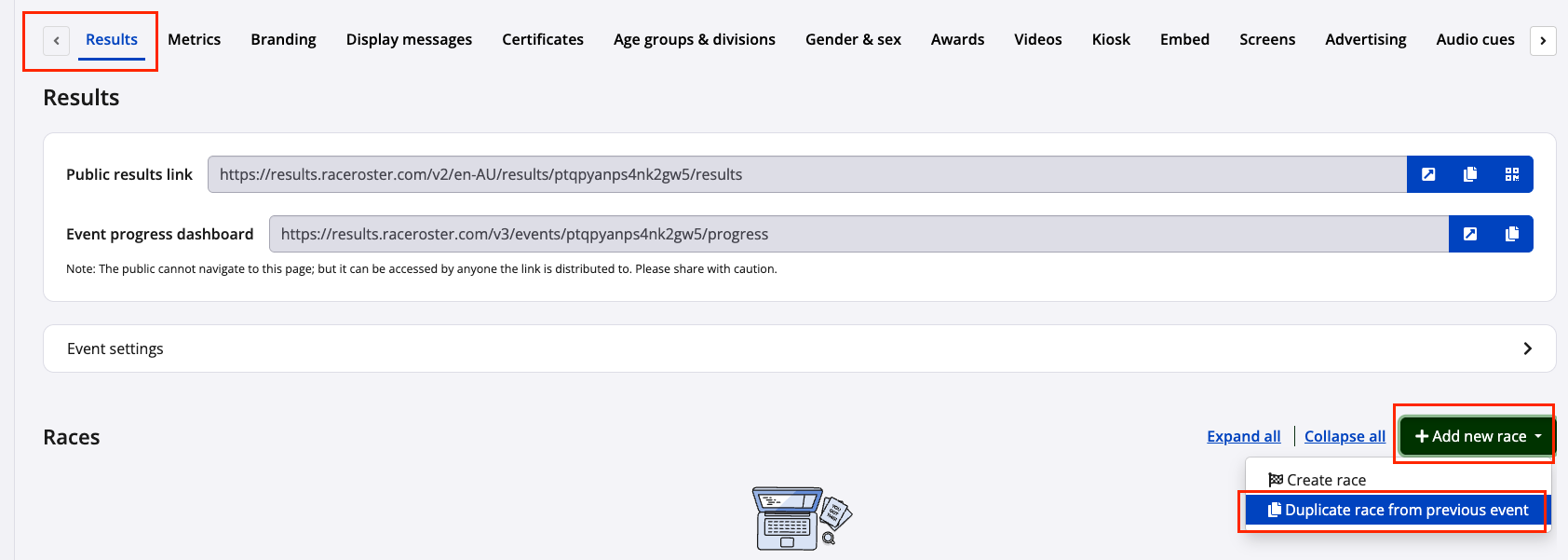
1) In the Timer Dashboard Results tab, click Add new race, then select Duplicate race from previous event.
2) Search for and select the event to duplicate races from, then click Continue
3) Select the race(s) to duplicate
4) To duplicate the associated awards, enable Include awards for each eligible race

5) Click Duplicate.
Once the duplication is complete, the selected races will appear in the Results Dashboard. Any included awards will be available under the Awards tab, where they can be reviewed and updated if required.
Important considerations
Before duplicating races and awards, keep the following in mind:
- Races can be duplicated independently or together with their associated awards.
- Awards can only be duplicated if they are assigned to a single race. Awards associated with multiple races are not eligible for duplication.
- If a duplicated award references an award group or gender category that does not yet exist in the destination event, Race Roster automatically creates it during the duplication process.
- Awards that rely on custom values can be duplicated; however, the destination event must contain the same custom values within its results for the award to function correctly.
- After duplication, review all duplicated races and awards to ensure the settings and eligibility criteria are correct for the new event
If additional assistance is required, contact timer@raceroster.com.