
Merge tags are placeholders used in emails or pages that automatically populate with participant or event-specific data.
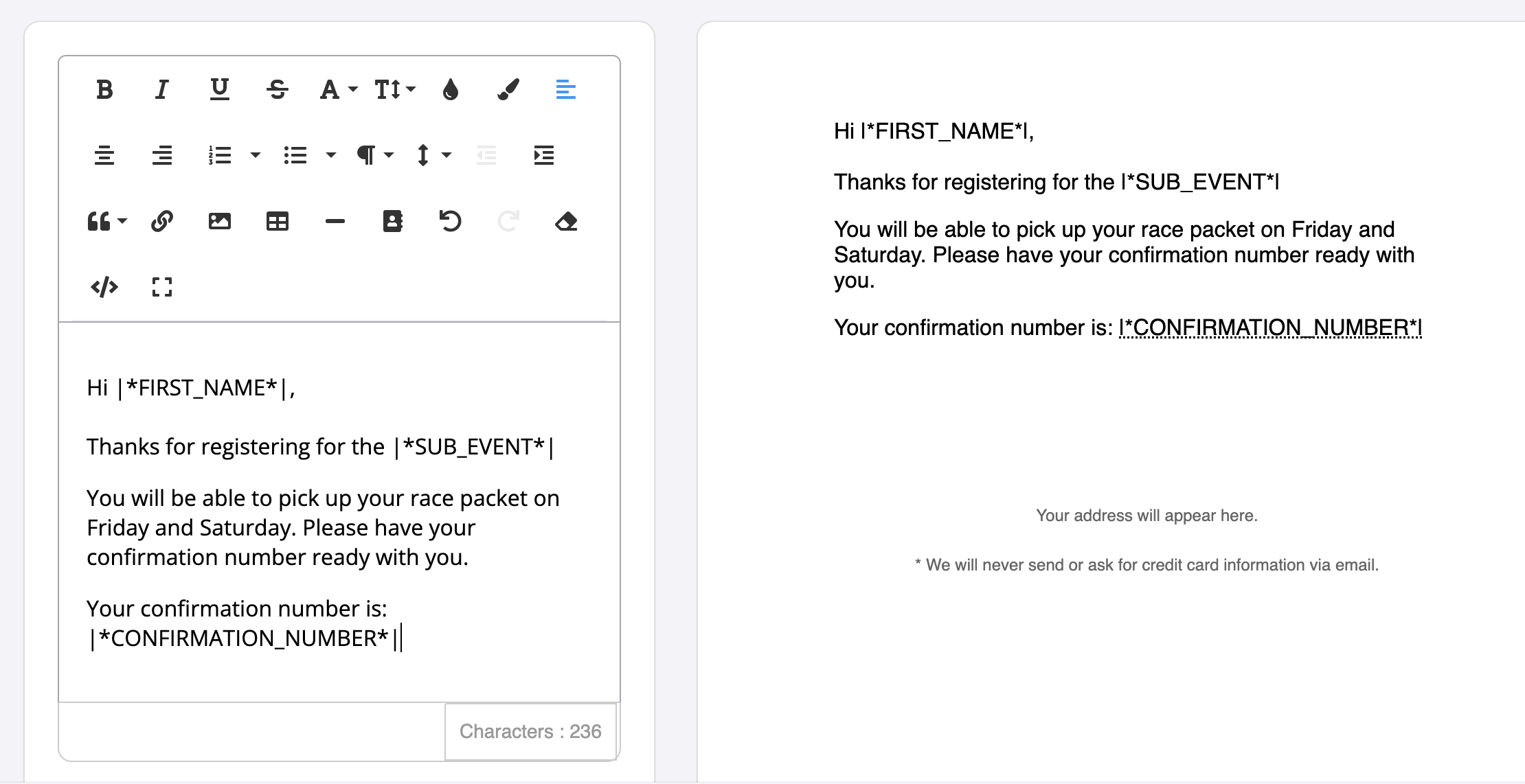
Merge tags allow you to add personalized information about your participants or volunteers to your email campaign. For example first name, sub-event, confirmation number, bib number and much more!
Merge Tag Index
| Tag | Information pulled |
| Achievement | Inserts the name of the achievement selected |
| Address | Participant or volunteer address |
| Address 2 | Participant or volunteer address, Line 2 |
| Age | Age (#) |
| Assigned code description | Description of third party code |
| Assigned code download link | Download link participants can use to view third party code |
| Assigned code expiration | Expiration day/time of third party code |
| Assigned code name | Name of third party code |
| Assigned code primary code | First code uploaded in third party codes |
| Assigned code secondary code | Second code uploaded in third party codes (if applicable) |
| Assigned code value | Value of third party code |
| Assigned volunteer activities | Activity they have automatically been assigned to OR the race director have assigned them too |
| Bib number | Bib number assigned on Race Roster |
| City | City |
| Claim URL | Provides a claim link for the user to claim their registration |
| Completed Achievement | The name of the achievement completed by the participant |
| Confirmation barcode image | Populates scannable barcode found within original confirmation email |
| Confirmation Number | Confirmation number from the user's original transactions |
| Confirmation QR code image | Populates scannable QR code found within original confirmation email |
| Confirmation receipt URL | URL that takes individual to the confirmation receipt |
| Contact email | Email participants can use to contact event organizers |
| Contact name | Contact name for the event page |
| Contact phone | Phone number participants can use to contact event organizers |
| Contact URL | URL that directs participants to event contact information outside of Race Roster |
| Country | Country |
| Custom question | Answer to corresponding hidden question |
| Date of birth | Date of birth |
| Distance of Sub-Event | Pulls in distance set within sub-event settings |
| Distance travelled (km) | Estimated distance from the participant's address to the event location |
| Distance travelled (mi) | Estimated distance from the participant's address to the event location |
| Event date | Date of the event |
| Event ID | Race Roster event ID number |
| Event name | Name of the event |
| Event Participant ID | Participant ID number found in the participant list |
| Event URL | Race Roster event page URL |
| Event year | Year of event |
| First name | First name |
| Full name | First and Last name |
| Fundraiser earnings | Fundraising dollars earned to their individual pledge page at the time the email is sent |
| Fundraising goal | Goal entered on pledge page as of date email is sent |
| Fundraising Organization | Charity associated to the event |
| Fundraising text | Customized text entered by the individual on their pledge page |
| Fundraising URL | Direct link to the participant or volunteers pledge page |
| Last Name | Last Name |
| Participant Dashboard URL | URL directing users to their participant dashboard |
| Participant ID | Unique ID assigned to each participant per event |
| Participant start group | The start group assigned to the participant for the event |
| Phone | Phone number |
| Postal Code | Postal code/Zip code |
| Product | The product associated with the participant’s registration |
| Product name | The name of the selected product |
| Product option | The selected option or variant of the product (e.g. size, colour) |
| Product quantity | The number of units of the product selected |
| Promo code used | Insert the code that was used during registration (if any) |
| Promoter URL | Participant or volunteers unique event promoter link (used for referral tracking) |
| Race Roster Account ID | Unique user ID number associated to each Race Roster account |
| Registration question | Answer to corresponding question |
| Registration total | Registration total displayed in a dollar amount |
| Registration total (numerical only) | Registration total |
| Requested volunteer activity | Activity they have selected in the registration form as their preferred station/activity |
| Results link | A direct link to view the participant’s event results |
| Sex/Gender | Sex/Gender entered during registration |
| Shipping address line one | Shipping address listed under shipping information |
| Shipping address line two | Shipping address line two listed under shipping information |
| Shipping city | City listed under shipping information |
| Shipping country | Country listed under shipping information |
| Shipping first name | First name listed under shipping information |
| Shipping last name | Last name listed under shipping information |
| Shipping phone number | Phone number listed under shipping information |
| Shipping state/province | State/province listed under shipping information |
| Shipping ZIP/postal code | ZIP/postal code listed under shipping information |
| State/province) | State/Province |
| Sub-event | Sub-event the participant has registered for |
| Sub-event ID | Unique ID number associated to each sub-event on Race Roster |
| Team category | Type of team assigned to the team selected (i.e. Open teams, Male/Female/Mixed team, etc.) |
| Team code | The code used to join a team |
| Team join URL | The link participants can use to join a team |
| Team name | Name of team entered |
| Team question | Answer to corresponding question answered during team creation or when joining a team |
| Team URL | URL to team fundraising page |
| Total amount raised (team) | The total amount the team has funraised |
| Transaction date (hh:mm:ss) | Transaction date with hours/minutes/seconds format |
| Transaction date (YYYY-MM-DD hh:mm:ss) | Transaction date with specific date and times included |
| Transaction date (YYYY-MM-DD) | Transaction date with year/month/date formate |
| Transaction receipt URL | URL linking to a copy of the user's transaction receipt |
| User locale | User’s language preference |
| Volunteer question | Answer to corresponding volunteer question |
| Year-over-year event group ID | ID number used to connect events across years |
| Year-over-year event group name | Group name used to connect events across years |
Results Merge Tags
Results merge tags let you insert results-specific details into certificates and results emails/SMS. All results fields are populated from the columns mapped during your results upload.
| Tag | Information pulled |
| AGE | Participant’s age (as recorded for the event) |
| DIVISION | Participant’s division / age group category |
| AGE_GROUP_GENDER_PLACE | Participant’s placing within their age group and gender category |
| AGE_GROUP_PLACE | Participant’s placing within their age group |
| AWARDS | Any awards earned by the participant (eg, podium/category awards) |
| BIB | Participant’s bib number |
| CHIP_START_TIME | Chip-recorded start time (when the participant crossed the start line) |
| CHIP_TIME | Official chip time (from chip start to finish) |
| DIVISION_PLACE | Participant’s placing within their division (age group) |
| EVENT_LOGO | Event logo image |
| EVENT_NAME | Event name |
| FINISH_TIME_LOCAL | Participant’s finish time in the event’s local time |
| FIRST_NAME | Participant’s first name |
| GENDER | Participant’s gender (as recorded) |
| GENDER_PLACE | Participant’s placing within their gender category |
| GUN_START_TIME | Official race start time (gun start) |
| LAST_NAME | Participant’s last name |
| NAME | Participant’s full name (first + last) |
| OVERALL_PACE | Participant’s overall average pace for the event distance |
| OVERALL_PLACE | Participant’s overall placing among all participants |
| SOURCE | Source/origin of the registration or result data (where available) |
| RACE_STATUS | Participant’s race status (eg, Finished, DNF, DNS) |
| SUB_EVENT_NAME | Name of the sub-event the participant is in (eg, 10K, Marathon) |
| GUN_TIME | Participant’s gun time (from official start to finish) |
| DISTANCE | Distance of the participant’s sub-event |