
The Top up your donation option gives donors the choice to make an additional contribution to help cover the costs associated with their donation. The event organizer can select to enable this feature, which will provide the option to the donor after selecting a donation amount.
How to allow donors to pay fees
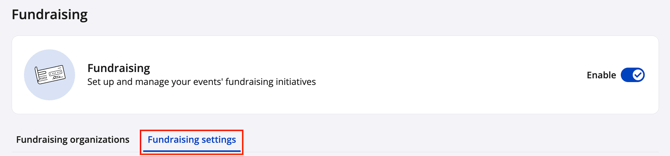
1. Search the menu for Settings → Fundraising.
2. Select the Fundraising settings tab and scroll down to the Fundraising settings section.
3. Enable Allow donor to pay fees.
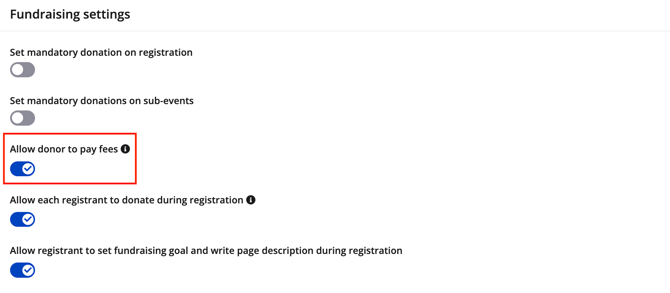
This will allow a donor to choose the option to top up their donation. It remains optional and can be deselected by the donor.
How this appears in the donation form
1. The donor selects the type of donation they will process:
- In registration donation
- Donation to an individual or team fundraising page
- General donation
2. The donor selects how much they would like to donate.
3. In the Top up your donation section of the donation form, the donor can check to make an additional contribution to help cover the costs associated with their donation. If selected, their total payment will be updated with those fees included.
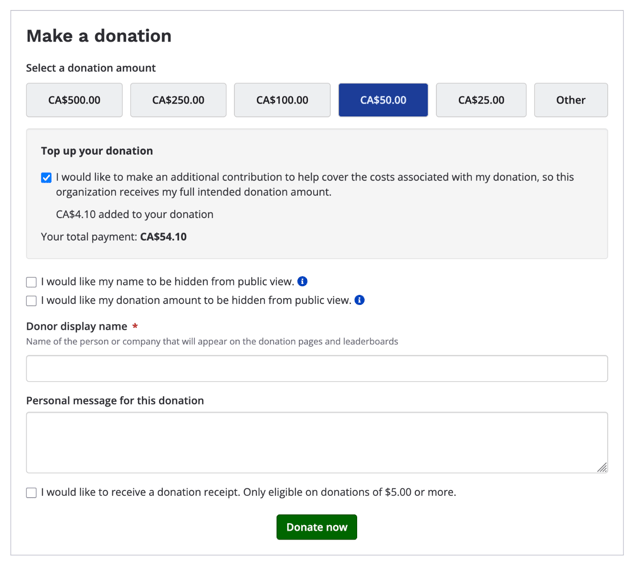
5. The donor will then complete the form and select Donate now to proceed to the billing section and complete the donation transaction.
Note: For tax receipting, the donor is eligible for the full amount as they have simply increased their donation amount to support the fundraising costs.
For additional questions regarding enabling this feature, please contact our team.