---
title: Using the event progress dashboard in results
description: Learn how to use the Event Progress Dashboard to monitor live participant progress, track checkpoints, and support race operations during an event.
---
[Skip to content](https://help.raceroster.com/en-us/knowledge-base/using-the-event-progress-dashboard-in-results#main-content)
[Submit a knowledge article idea](https://help.raceroster.com/en-us/knowledge-base/kb-tickets/new?hsLang=en-us)

Open main navigation
Close main navigation
- [Submit a knowledge article idea](https://help.raceroster.com/en-us/knowledge-base/kb-tickets/new)
How can we help you?
- There are no suggestions because the search field is empty.
1. [Race Roster Knowledge Base](https://help.raceroster.com/en-us/knowledge-base?hsLang=en-us)
2. [Timers](https://help.raceroster.com/en-us/knowledge-base/timers?hsLang=en-us)
3. [Timing Tools](https://help.raceroster.com/en-us/knowledge-base/timers?hsLang=en-us#timing-tools)
July 21, 2026
# Using the event progress dashboard in results
During an event, multiple teams rely on up-to-date participant progress to support race operations. This can include course marshals, emergency services, traffic management, aid station volunteers, and event staff coordinating course closures and reopening.
The **Event Progress Dashboard** provides a **live** view of participant progress throughout the event, allowing authorised users to monitor activity without requiring access to the Timer Dashboard. Information such as the current race leader, the number of participants who have passed a specific split or checkpoint, and participants who may have missed a checkpoint is automatically updated as results are processed.
By sharing the **Event Progress Dashboard** with relevant event personnel, timing teams can reduce interruptions and enable other teams to independently monitor race progress. This helps improve communication across the event while allowing timers to remain focused on processing live results.
---
### Sharing the link
The Event Progress Dashboard URL can be found within the event's Results Dashboard. To locate it:
1. Navigate to **Add-Ons \> Results** from the Event Dashboard.
2. Open the **Results** tab.
3. Under the **Results** heading, locate the second URL labelled **Event Progress Dashboard**.
4. Copy and share this URL with event staff who require access to live participant progress.
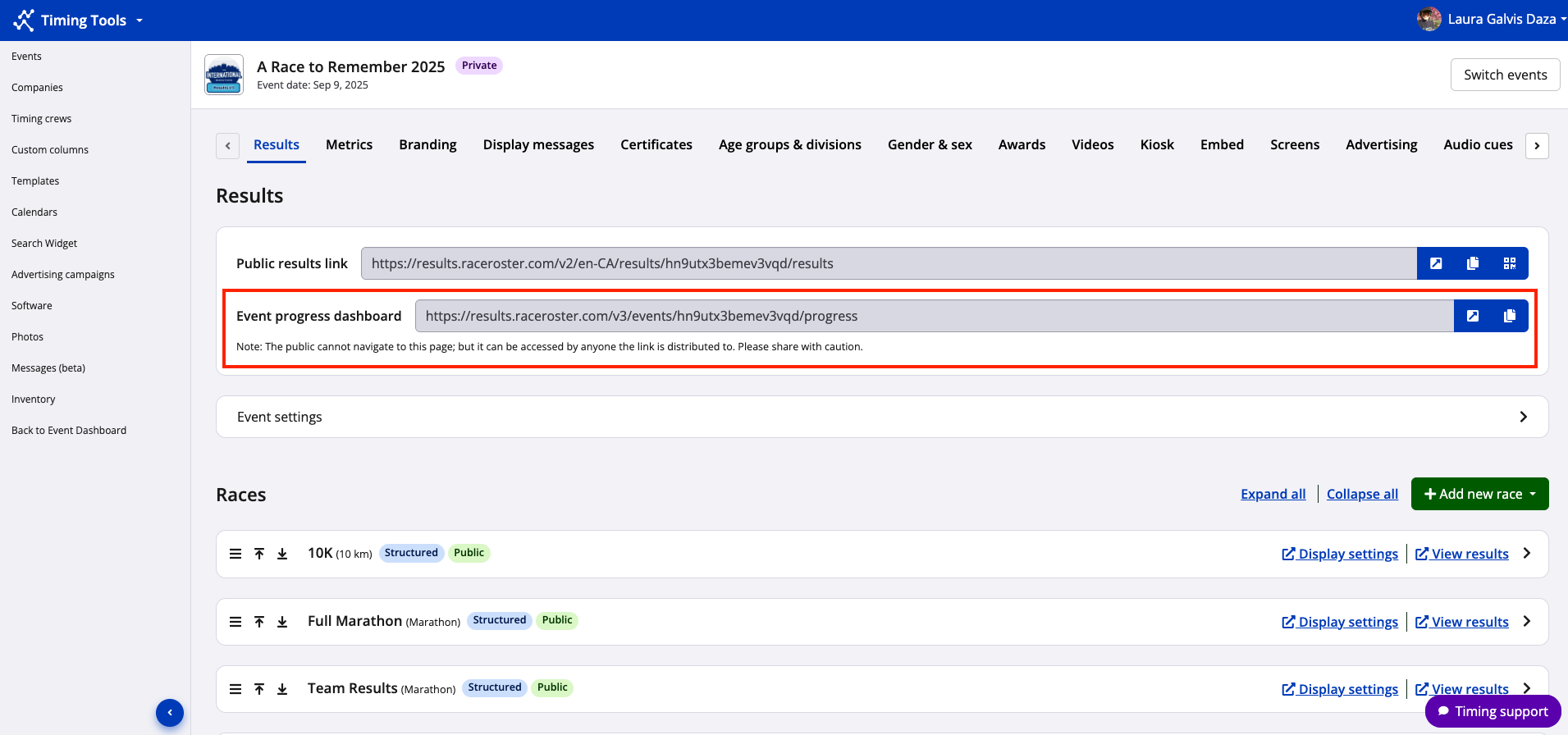
Select the **Open** (arrow) icon to launch the Event Progress Dashboard in a new browser tab and view the current participant progress across all applicable races.
Select the **Copy** icon to copy the **Event Progress Dashboard URL**. The link can then be shared via email, messaging platforms, or other communication channels with event staff who need access to live progress updates.
The screenshot below shows an example of the **Event Progress Dashboard.**
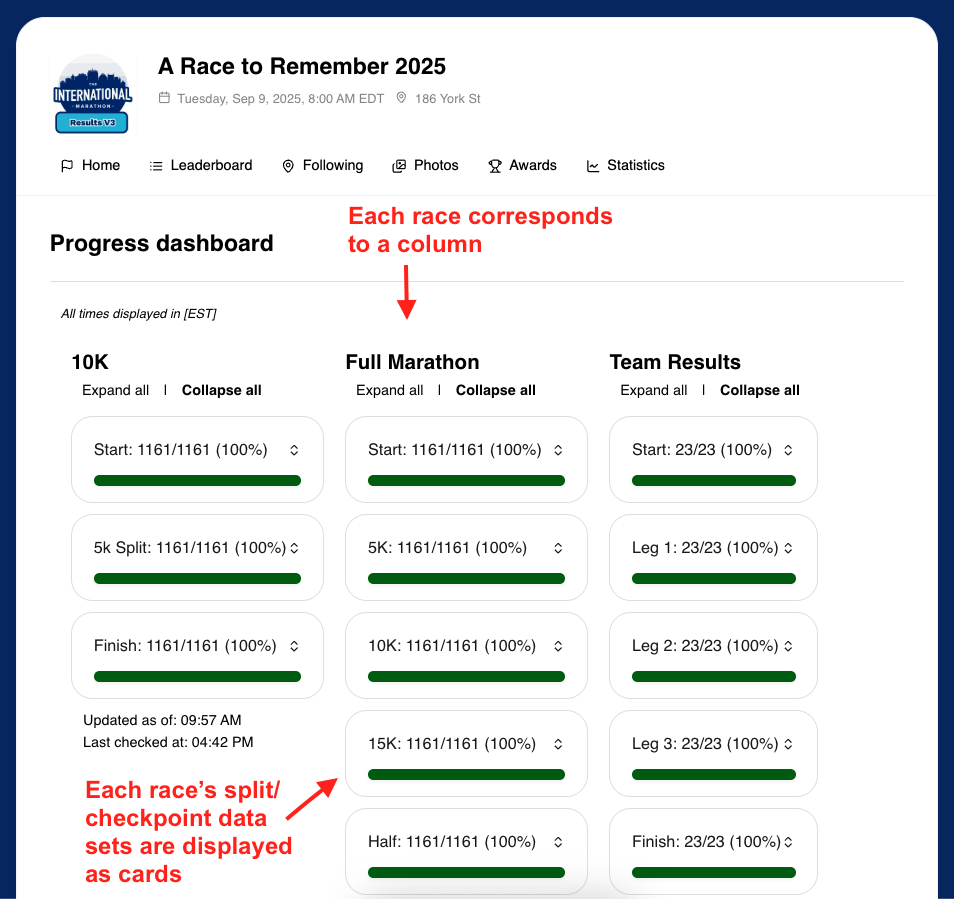
**Note:** The Event Progress Dashboard should only be shared with authorised event personnel who require access to live participant progress, such as event staff, course marshals, traffic management, emergency services, and aid station volunteers. The dashboard is not intended for participants or spectators. For public race progress and results, share the event's public Results page instead.
**Tip:** The Event Progress Dashboard displays live information as results are processed. Until races, splits or checkpoints, and participant results have been configured and uploaded, the dashboard will contain little or no data. The dashboard is most useful during the event while results are actively being processed.
---
### Interpreting the data
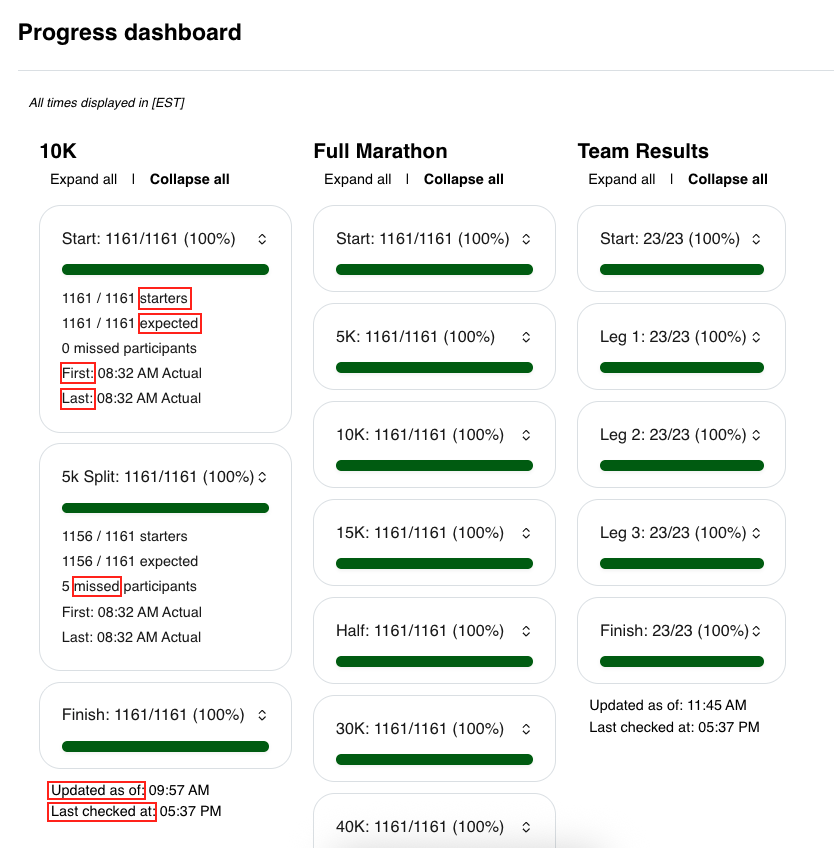
The **Event Progress Dashboard** provides a high-level overview of participant progress at each timing point throughout an event. The following terms are used throughout the dashboard:
- **Starters:** The number of participants who have recorded either a local start chip time or a local start gun time.
- **Expected:** The number of participants expected to arrive at the current timing point based on having recorded a time at the previous timing point (or the start). This value updates as participants progress through the course.
- **Missed:** The number of participants who recorded a time at a subsequent timing point but did not record a time at one or more earlier timing points. These participants are considered to have missed those timing points, and the associated Starter and Expected statistics are adjusted accordingly.
- **First:** The predicted time of day (when Live Predictive Tracking is enabled) or the actual time of day when the first participant crossed the timing point.
- **Last:** The predicted time of day (when Live Predictive Tracking is enabled) or the actual time of day when the last participant crossed the timing point.
- **Updated as of:** The date and time when the most recent results set was processed for the race.
- **Last checked at:** The date and time when the Event Progress Dashboard last checked for newly processed results to update the displayed statistics.
The screenshot below highlights where each of these values is displayed within the Event Progress Dashboard.
---
### How the Event Progress Dashboard supports event operations
The Event Progress Dashboard provides event staff and authorised third parties with a centralised view of participant progress across all races. This allows teams to monitor the status of the event in real time without needing direct access to the Timer Dashboard.
**Using the dashboard, event personnel can:**
- Monitor participant progress through each split or checkpoint.
- View how many participants have passed or missed each timing point.
- See the first and last participant to reach each timing point.
- When Live Predictive Tracking is enabled, view predicted arrival times for the first and last participants at upcoming timing points to assist with operational planning.
**This information can help teams coordinate activities such as:**
- Reopening roads and intersections.
- Packing down timing equipment and course infrastructure.
- Closing aid stations, water stations, and other on-course facilities.
- Managing emergency services and operational resources throughout the event.
The Event Progress Dashboard does not require users to sign in. Access is provided via a unique URL that can be shared by the timer with authorised event personnel. While the dashboard is not publicly discoverable, the link should only be shared with staff and third parties who require access to support event operations.
---
If additional assistance is required, please contact the Race Roster Timing team at [**timer@raceroster.com**](mailto:timer@raceroster.com).
- [Event Organizers and Race Directors](https://help.raceroster.com/en-us/knowledge-base/event-organizers-and-race-directors?hsLang=en-us#main-content)
- [Participant Management](https://help.raceroster.com/en-us/knowledge-base/event-organizers-and-race-directors?hsLang=en-us#participant-management)
- [Financials](https://help.raceroster.com/en-us/knowledge-base/event-organizers-and-race-directors?hsLang=en-us#financials)
- [Marketing & Promotions](https://help.raceroster.com/en-us/knowledge-base/event-organizers-and-race-directors?hsLang=en-us#marketing-promotions)
- [Email Campaigns, MailChimp Integration](https://help.raceroster.com/en-us/knowledge-base/event-organizers-and-race-directors?hsLang=en-us#email-campaigns-mailchimp-integration)
- [Products](https://help.raceroster.com/en-us/knowledge-base/event-organizers-and-race-directors?hsLang=en-us#products)
- [Team Management and Settings](https://help.raceroster.com/en-us/knowledge-base/event-organizers-and-race-directors?hsLang=en-us#team-management-and-settings)
- [Onsite App](https://help.raceroster.com/en-us/knowledge-base/event-organizers-and-race-directors?hsLang=en-us#onsite-app)
- [Registration Questions](https://help.raceroster.com/en-us/knowledge-base/event-organizers-and-race-directors?hsLang=en-us#registration-questions)
- [Fundraising Settings and Receipts](https://help.raceroster.com/en-us/knowledge-base/event-organizers-and-race-directors?hsLang=en-us#fundraising-settings-and-receipts)
- [Promo Codes, Discounts, and Gifting Codes](https://help.raceroster.com/en-us/knowledge-base/event-organizers-and-race-directors?hsLang=en-us#promo-codes-discounts-and-gifting-codes)
- [Virtual](https://help.raceroster.com/en-us/knowledge-base/event-organizers-and-race-directors?hsLang=en-us#virtual)
- [Results](https://help.raceroster.com/en-us/knowledge-base/event-organizers-and-race-directors?hsLang=en-us#results)
- [Access codes](https://help.raceroster.com/en-us/knowledge-base/event-organizers-and-race-directors?hsLang=en-us#access-codes)
- [Director Access and Settings](https://help.raceroster.com/en-us/knowledge-base/event-organizers-and-race-directors?hsLang=en-us#director-access-and-settings)
- [Pricing](https://help.raceroster.com/en-us/knowledge-base/event-organizers-and-race-directors?hsLang=en-us#pricing)
- [Event Page Settings](https://help.raceroster.com/en-us/knowledge-base/event-organizers-and-race-directors?hsLang=en-us#event-page-settings)
- [Your Dashboard](https://help.raceroster.com/en-us/knowledge-base/event-organizers-and-race-directors?hsLang=en-us#your-dashboard)
- [Sub-events](https://help.raceroster.com/en-us/knowledge-base/event-organizers-and-race-directors?hsLang=en-us#sub-events)
- [Other FAQs](https://help.raceroster.com/en-us/knowledge-base/event-organizers-and-race-directors?hsLang=en-us#other-faqs)
- [Volunteers](https://help.raceroster.com/en-us/knowledge-base/event-organizers-and-race-directors?hsLang=en-us#volunteers)
- [Create, Edit or Take Your Event Live](https://help.raceroster.com/en-us/knowledge-base/event-organizers-and-race-directors?hsLang=en-us#create-edit-or-take-your-event-live)
- [Waivers](https://help.raceroster.com/en-us/knowledge-base/event-organizers-and-race-directors?hsLang=en-us#waivers)
- [Reports](https://help.raceroster.com/en-us/knowledge-base/event-organizers-and-race-directors?hsLang=en-us#reports)
- [Participants and Fundraisers](https://help.raceroster.com/en-us/knowledge-base/participants-and-fundraisers?hsLang=en-us#main-content)
- [Participant FAQs](https://help.raceroster.com/en-us/knowledge-base/participants-and-fundraisers?hsLang=en-us#participant-faqs)
- [Fundraising](https://help.raceroster.com/en-us/knowledge-base/participants-and-fundraisers?hsLang=en-us#fundraising)
- [Gift Registrations](https://help.raceroster.com/en-us/knowledge-base/participants-and-fundraisers?hsLang=en-us#gift-registrations)
- [Sign In and Manage Registration](https://help.raceroster.com/en-us/knowledge-base/participants-and-fundraisers?hsLang=en-us#sign-in-and-manage-registration)
- [Transfer Registration](https://help.raceroster.com/en-us/knowledge-base/participants-and-fundraisers?hsLang=en-us#transfer-registration)
- [Access Codes](https://help.raceroster.com/en-us/knowledge-base/participants-and-fundraisers?hsLang=en-us#access-codes)
- [Teams](https://help.raceroster.com/en-us/knowledge-base/participants-and-fundraisers?hsLang=en-us#teams)
- [Security & Compliance](https://help.raceroster.com/en-us/knowledge-base/participants-and-fundraisers?hsLang=en-us#security-compliance)
- [Promo Codes](https://help.raceroster.com/en-us/knowledge-base/participants-and-fundraisers?hsLang=en-us#promo-codes)
- [Race Roster CRM](https://help.raceroster.com/en-us/knowledge-base/race-roster-crm?hsLang=en-us#main-content)
- [Organizations](https://help.raceroster.com/en-us/knowledge-base/race-roster-crm?hsLang=en-us#organizations)
- [Contact Management and Validation Lists](https://help.raceroster.com/en-us/knowledge-base/race-roster-crm?hsLang=en-us#contact-management-and-validation-lists)
- [Reporting](https://help.raceroster.com/en-us/knowledge-base/race-roster-crm?hsLang=en-us#reporting)
- [Events and Event Groups](https://help.raceroster.com/en-us/knowledge-base/race-roster-crm?hsLang=en-us#events-and-event-groups)
- [Campaigns and Marketing](https://help.raceroster.com/en-us/knowledge-base/race-roster-crm?hsLang=en-us#campaigns-and-marketing)
- [Non-profit Organizations](https://help.raceroster.com/en-us/knowledge-base/race-roster-crm?hsLang=en-us#non-profit-organizations)
- [Fundraising Coordinators](https://help.raceroster.com/en-us/knowledge-base/fundraising-coordinators?hsLang=en-us#main-content)
- [Resources](https://help.raceroster.com/en-us/knowledge-base/fundraising-coordinators?hsLang=en-us#resources)
- [Participant and Team Fundraising](https://help.raceroster.com/en-us/knowledge-base/fundraising-coordinators?hsLang=en-us#participant-and-team-fundraising)
- [Reporting](https://help.raceroster.com/en-us/knowledge-base/fundraising-coordinators?hsLang=en-us#reporting)
- [Timers](https://help.raceroster.com/en-us/knowledge-base/timers?hsLang=en-us#main-content)
- [Account settings](https://help.raceroster.com/en-us/knowledge-base/timers?hsLang=en-us#account-settings)
- [Results](https://help.raceroster.com/en-us/knowledge-base/timers?hsLang=en-us#results)
- [Timing Tools](https://help.raceroster.com/en-us/knowledge-base/timers?hsLang=en-us#timing-tools)
- [Bib Assignment](https://help.raceroster.com/en-us/knowledge-base/timers?hsLang=en-us#bib-assignment)
- [Participant Data and Reports](https://help.raceroster.com/en-us/knowledge-base/timers?hsLang=en-us#participant-data-and-reports)
- [The ASICS Runkeeper™ app](https://help.raceroster.com/en-us/knowledge-base/the-asics-runkeeper-app?hsLang=en-us#main-content)
- [The ASICS Runkeeper™ app](https://help.raceroster.com/en-us/knowledge-base/the-asics-runkeeper-app?hsLang=en-us#the-asics-runkeeper-app)
[](https://raceroster.com)
Copyright © 2026, Race Roster