---
title: Understanding smart links
description: Smart links
---
[Skip to content](https://help.raceroster.com/en-us/knowledge-base/understanding-smart-links#main-content)
[Submit a knowledge article idea](https://help.raceroster.com/en-us/knowledge-base/kb-tickets/new?hsLang=en-us)

Open main navigation
Close main navigation
- [Submit a knowledge article idea](https://help.raceroster.com/en-us/knowledge-base/kb-tickets/new)
How can we help you?
- There are no suggestions because the search field is empty.
1. [Race Roster Knowledge Base](https://help.raceroster.com/en-us/knowledge-base?hsLang=en-us)
2. [Event Organizers and Race Directors](https://help.raceroster.com/en-us/knowledge-base/event-organizers-and-race-directors?hsLang=en-us)
3. [Marketing & Promotions](https://help.raceroster.com/en-us/knowledge-base/event-organizers-and-race-directors?hsLang=en-us#marketing-promotions)
April 22, 2026
# Understanding smart links
### **What is a "smart link"?**
A smart link is a **URL that modifies how the online event registration form appears to a user** in a defined manner.
Smart links could be system generated (sub-events, sub-event groups) or user generated (custom smart links).
Smart links function separately from other types of registration links, such as:
- promo code links
- access code links
- pre-selected sub-event links
- team join links
### Features of a smart link
Each smart link has a unique code that allows the registration form to apply the link’s settings.
Template:
[`https://raceroster.com/registration/[event_id]/entry?smart_link=[smart_link_id]`](https://raceroster.com/registration/[event_id]/entry?smart_link=[smart_link_id])
This method of linking provides the following benefits:
- links are short and simple
- link settings are obscured from the registrant, so there wouldn’t be a way to "guess" it
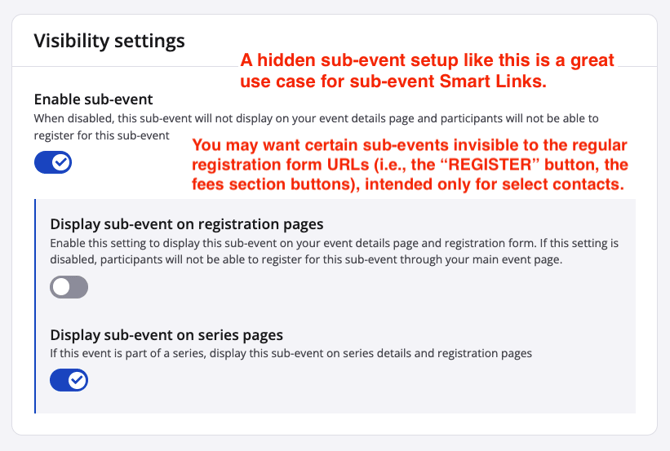
Smart links also always allow linking to sub-events that are set to be **hidden in registration**. This allows you to hide certain sub-events from the public, and then send smart links to select groups of people for the hidden sub-events. **Note:** Smart links will *not* work for disabled sub-events.
### **How can I use smart links?**
Smart links can be used for a variety of scenarios. The main reason to use a smart link is to tailor the registration form to a particular person or group.
For example:
- a **sub-event smart link** will omit all other sub-events from registration
- *Use case: You could send emails to elite athletes as they are accepted to compete in your marathon. In the email, use the smart link to the "Elite Marathon" hidden sub-event as the call-to-action button. This way, you prompt each elite athlete to only register in that sub-event, now visible to them. What's more, you reduce their risk of accidentally selecting a separate but similarly-named sub-event such as the "Marathon".*
- a **sub-event group smart link** will omit the sub-events of all other sub-event groups from registration
- *Use case: You could create a social media campaign specifically to promote one set of races over another—say, the Saturday ones. To go with your campaign, use the smart link to the "Saturday Races" sub-event group as the go-to URL. This way, you prompt responsive audiences to only register in sub-events within that sub-event group, removing options from other groups to further drive success for your campaign.*
- a **custom smart link** will allow you to combine different options together, such as promo codes and access codes, into a single link.
- *Use case: You could create a custom smart link combining an access code and promo code for a locals-runners-only email campaign that grants early and discounted access to your event.*
In situations where you have select contacts or audiences that should be making a pre-determined choice, smart links take the guess work and reading burden away from registrants. All you have to do is copy a smart link, then paste it somewhere for prospects to click and get registered exactly as they should.
### Where can I find smart links?
There are currently two locations within the event dashboard. Read the sections for steps to copy or create, accordingly.
#### **1. Sub-event & sub-event group smart links**
From your event dashboard, navigate to **Settings** \> **Sub-events**.
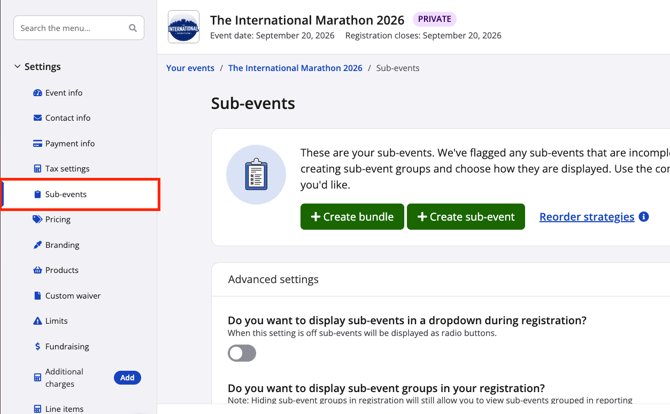
Once on the sub-events settings page:
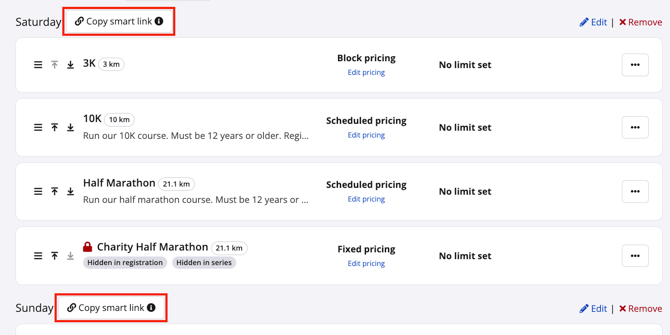
- Sub-event group smart links can be copied using the **“Copy smart link” button beside each sub-event group title**
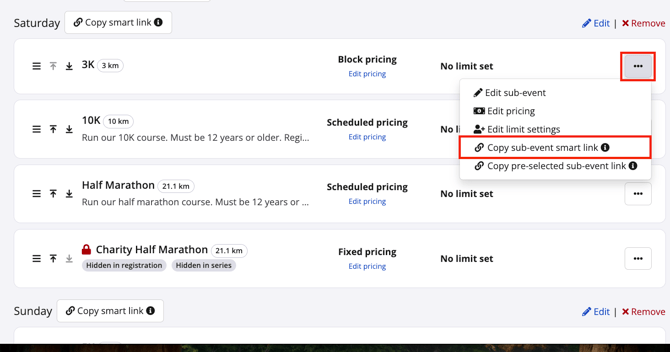
- Sub-event smart links can be copied using the **“Copy sub-event smart link” option within each sub-event’s action menu** (the “…” button)
**Notes:**
- by hovering over the **"Copy sub-event smart link"** menu option with the mouse, you will see a brief information bubble pop up, with details
- sub-event Smart Links should *not* be confused with pre-selected sub-event links (more details on this in an FAQ below)
#### **2. Custom smart links**
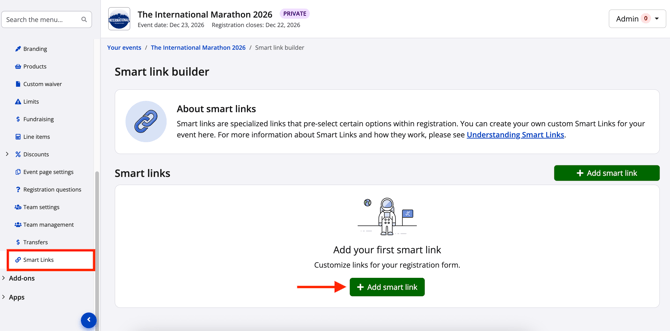
From your event dashboard, navigate to **Settings \> Smart links.** Use the green **"Add smart link"** button to create your first custom smart link.
****
From the "Create smart link" page, choose whether or not the smart link will restrict to a single sub-event.
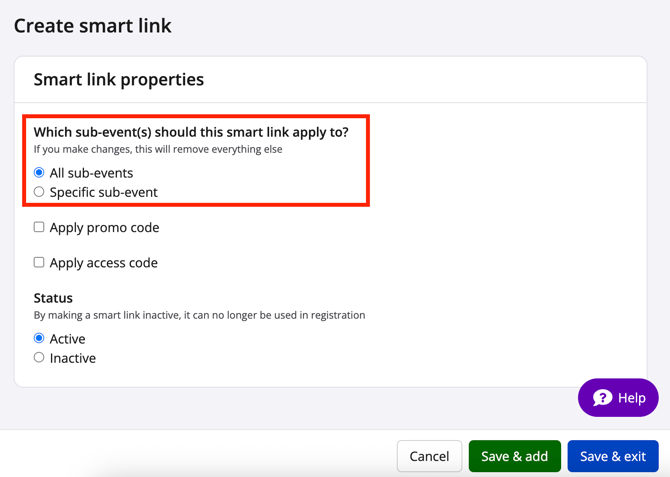
Next, add on promo or access codes to the smart link. The options available for each promo and access codes will be dependent on the sub-event selection. For example, if you chose “All sub-events”, only promo codes and access codes that are also set to “All sub-events” will be available for selection.
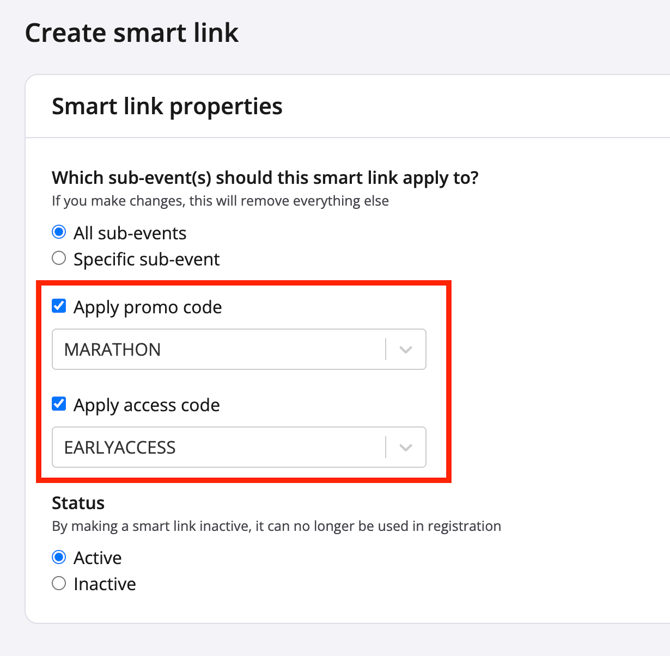
Finally, select the appropriate smart link status—"Active" to allow use by anyone you share the link with, "Inactive" to deactivate it. **Note:** When a user clicks to follow an inactive custom smart link, they will be redirected to the regular registration form.
### **Smart link FAQs**
#### ***Q: How does the sub-event being enabled and/or visible affect the smart links?***
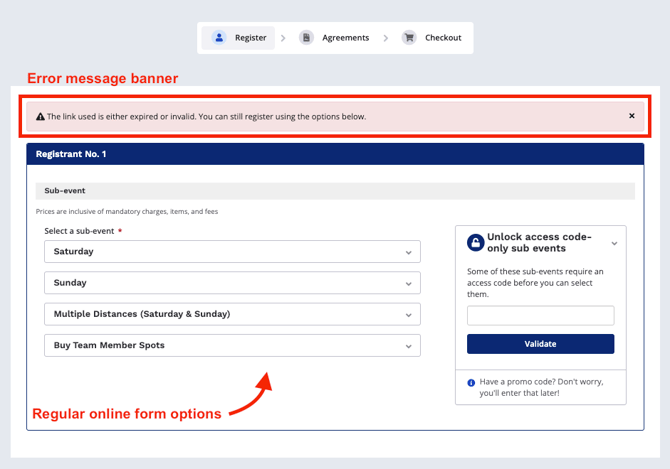
A: For a smart link to work as intended, that sub-event's **“Enable sub-event”** toggle must be turned on. However, smart links have been designed to override the **“Display sub-event on registration pages”** toggle, precisely so that hidden sub-events can be accessed via smart links.
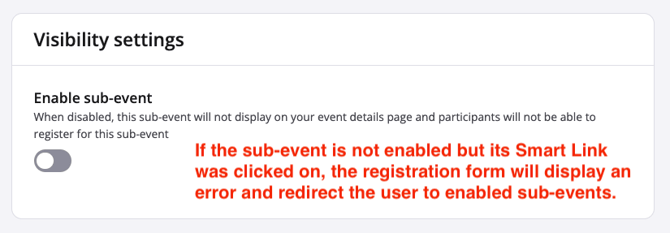
### **
#### ***Q: How does a smart link behave when it links to a sub-event that has since sold out or been deleted?***
A: If the smart link is for a sold-out sub-event, or a sub-event group where all sub-events are sold out, or a since-deleted sub-event, registration will redirect the user. The user will still enter registration, where they’ll see a red warning message banner saying **"The link used is either expired or invalid. You can still register using the options below."** This is the same behaviour as in the previous FAQ.
#### ***Q: How does a custom smart link behave when it uses an access code that has since been deactivated or fully redeemed?***
A: Access codes that have been deactivated cannot be used by smart links when entering registration, so the registration form will not enter the access code. Meanwhile, access codes that have been fully redeemed will appear in the access code entry field of registration, but the user will receive an error message.
#### ***Q: How does a custom smart link behave when it uses a promo code that has since been deactivated or fully redeemed?***
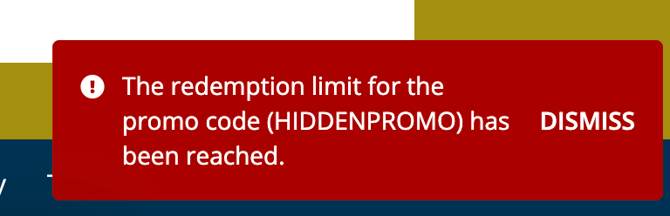
A: When the registrant clicks the "Continue" button at the bottom of the registration page, the system will check if the promo code is valid. An error pop-up will appear with any reason why the entered promo code could not be used. This is the same error messaging that appears for non-smart link promo codes.
#### ***Q: Does using the smart link limit all registrants in the transaction to its modification?***
A: Yes. After entering the registration form with the use of a smart link and completing all fields for Registrant No. 1, additional registrants will also be given the option(s) corresponding to that smart link.
#### ***Q: Does using the smart link cache or somehow lock the user into only accessing that sub-event or sub-event group?***
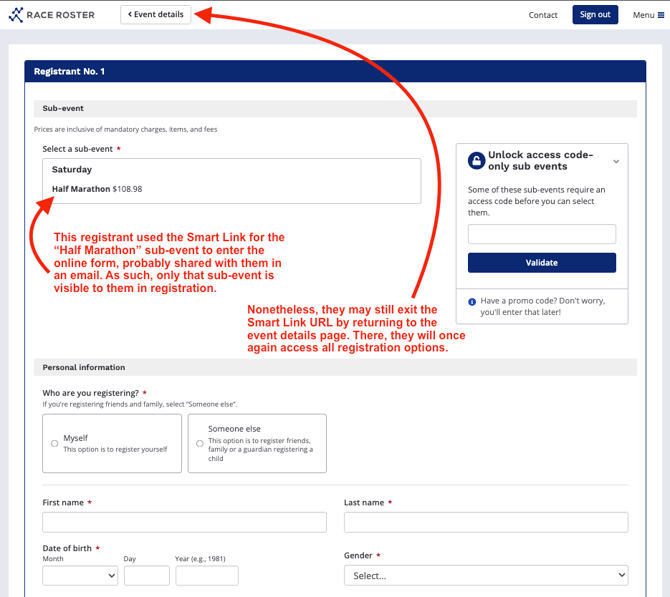
A: No. The button to return to the event details page will still be visible. If the user exits the smart link URL and then re-enters registration, all enabled sub-events and sub-event groups will be visible again.
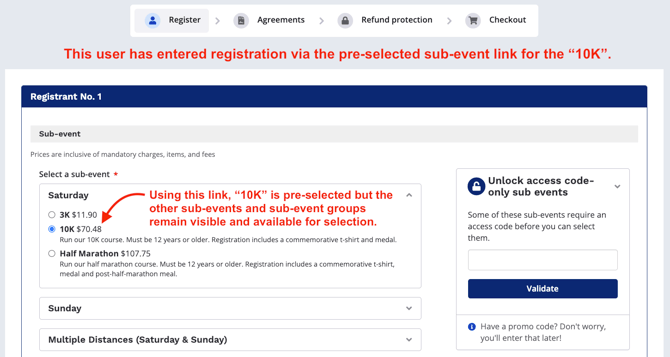
#### ***Q: How does the pre-selected sub-event link differ from a smart link?***
A: The pre-selected sub-event link is built as follows:
```
[event details page URL]/register?event=[sub-event number]
```
When a user follows that link—and the sub-event is not hidden—the sub-event is pre-selected for them in registration. However, they can still see all other visible sub-events and sub-event groups, if applicable, to allow for a change in selection without needing to exit the form.
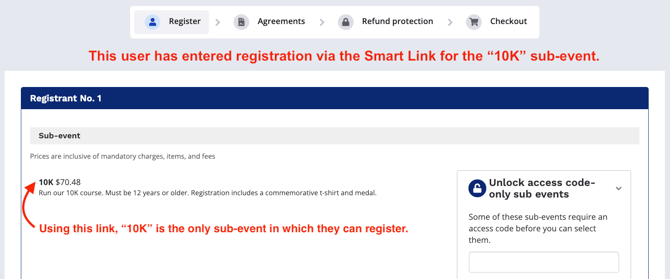
By contrast, following a sub-event smart link will result in the user *only* viewing the intended sub-event.
See screenshot below for a visual of registration when using a sub-event smart link.
See screenshot below for a visual of registration when using a pre-selected sub-event link.
\---
If you as an event organizer have further questions regarding smart links, please email us at [director@raceroster.com](mailto:director@raceroster.com) [(director@raceroster.com.au](https://support.raceroster.com/hc/en-us/articles/\(director@raceroster.com.au)).
- [Event Organizers and Race Directors](https://help.raceroster.com/en-us/knowledge-base/event-organizers-and-race-directors?hsLang=en-us#main-content)
- [Participant Management](https://help.raceroster.com/en-us/knowledge-base/event-organizers-and-race-directors?hsLang=en-us#participant-management)
- [Financials](https://help.raceroster.com/en-us/knowledge-base/event-organizers-and-race-directors?hsLang=en-us#financials)
- [Marketing & Promotions](https://help.raceroster.com/en-us/knowledge-base/event-organizers-and-race-directors?hsLang=en-us#marketing-promotions)
- [Email Campaigns, MailChimp Integration](https://help.raceroster.com/en-us/knowledge-base/event-organizers-and-race-directors?hsLang=en-us#email-campaigns-mailchimp-integration)
- [Products](https://help.raceroster.com/en-us/knowledge-base/event-organizers-and-race-directors?hsLang=en-us#products)
- [Team Management and Settings](https://help.raceroster.com/en-us/knowledge-base/event-organizers-and-race-directors?hsLang=en-us#team-management-and-settings)
- [Onsite App](https://help.raceroster.com/en-us/knowledge-base/event-organizers-and-race-directors?hsLang=en-us#onsite-app)
- [Registration Questions](https://help.raceroster.com/en-us/knowledge-base/event-organizers-and-race-directors?hsLang=en-us#registration-questions)
- [Fundraising Settings and Receipts](https://help.raceroster.com/en-us/knowledge-base/event-organizers-and-race-directors?hsLang=en-us#fundraising-settings-and-receipts)
- [Promo Codes, Discounts, and Gifting Codes](https://help.raceroster.com/en-us/knowledge-base/event-organizers-and-race-directors?hsLang=en-us#promo-codes-discounts-and-gifting-codes)
- [Virtual](https://help.raceroster.com/en-us/knowledge-base/event-organizers-and-race-directors?hsLang=en-us#virtual)
- [Results](https://help.raceroster.com/en-us/knowledge-base/event-organizers-and-race-directors?hsLang=en-us#results)
- [Access codes](https://help.raceroster.com/en-us/knowledge-base/event-organizers-and-race-directors?hsLang=en-us#access-codes)
- [Director Access and Settings](https://help.raceroster.com/en-us/knowledge-base/event-organizers-and-race-directors?hsLang=en-us#director-access-and-settings)
- [Pricing](https://help.raceroster.com/en-us/knowledge-base/event-organizers-and-race-directors?hsLang=en-us#pricing)
- [Event Page Settings](https://help.raceroster.com/en-us/knowledge-base/event-organizers-and-race-directors?hsLang=en-us#event-page-settings)
- [Your Dashboard](https://help.raceroster.com/en-us/knowledge-base/event-organizers-and-race-directors?hsLang=en-us#your-dashboard)
- [Sub-events](https://help.raceroster.com/en-us/knowledge-base/event-organizers-and-race-directors?hsLang=en-us#sub-events)
- [Other FAQs](https://help.raceroster.com/en-us/knowledge-base/event-organizers-and-race-directors?hsLang=en-us#other-faqs)
- [Volunteers](https://help.raceroster.com/en-us/knowledge-base/event-organizers-and-race-directors?hsLang=en-us#volunteers)
- [Create, Edit or Take Your Event Live](https://help.raceroster.com/en-us/knowledge-base/event-organizers-and-race-directors?hsLang=en-us#create-edit-or-take-your-event-live)
- [Waivers](https://help.raceroster.com/en-us/knowledge-base/event-organizers-and-race-directors?hsLang=en-us#waivers)
- [Reports](https://help.raceroster.com/en-us/knowledge-base/event-organizers-and-race-directors?hsLang=en-us#reports)
- [Participants and Fundraisers](https://help.raceroster.com/en-us/knowledge-base/participants-and-fundraisers?hsLang=en-us#main-content)
- [Participant FAQs](https://help.raceroster.com/en-us/knowledge-base/participants-and-fundraisers?hsLang=en-us#participant-faqs)
- [Fundraising](https://help.raceroster.com/en-us/knowledge-base/participants-and-fundraisers?hsLang=en-us#fundraising)
- [Gift Registrations](https://help.raceroster.com/en-us/knowledge-base/participants-and-fundraisers?hsLang=en-us#gift-registrations)
- [Sign In and Manage Registration](https://help.raceroster.com/en-us/knowledge-base/participants-and-fundraisers?hsLang=en-us#sign-in-and-manage-registration)
- [Transfer Registration](https://help.raceroster.com/en-us/knowledge-base/participants-and-fundraisers?hsLang=en-us#transfer-registration)
- [Access Codes](https://help.raceroster.com/en-us/knowledge-base/participants-and-fundraisers?hsLang=en-us#access-codes)
- [Teams](https://help.raceroster.com/en-us/knowledge-base/participants-and-fundraisers?hsLang=en-us#teams)
- [Security & Compliance](https://help.raceroster.com/en-us/knowledge-base/participants-and-fundraisers?hsLang=en-us#security-compliance)
- [Promo Codes](https://help.raceroster.com/en-us/knowledge-base/participants-and-fundraisers?hsLang=en-us#promo-codes)
- [Race Roster CRM](https://help.raceroster.com/en-us/knowledge-base/race-roster-crm?hsLang=en-us#main-content)
- [Organizations](https://help.raceroster.com/en-us/knowledge-base/race-roster-crm?hsLang=en-us#organizations)
- [Contact Management and Validation Lists](https://help.raceroster.com/en-us/knowledge-base/race-roster-crm?hsLang=en-us#contact-management-and-validation-lists)
- [Reporting](https://help.raceroster.com/en-us/knowledge-base/race-roster-crm?hsLang=en-us#reporting)
- [Events and Event Groups](https://help.raceroster.com/en-us/knowledge-base/race-roster-crm?hsLang=en-us#events-and-event-groups)
- [Campaigns and Marketing](https://help.raceroster.com/en-us/knowledge-base/race-roster-crm?hsLang=en-us#campaigns-and-marketing)
- [Non-profit Organizations](https://help.raceroster.com/en-us/knowledge-base/race-roster-crm?hsLang=en-us#non-profit-organizations)
- [Fundraising Coordinators](https://help.raceroster.com/en-us/knowledge-base/fundraising-coordinators?hsLang=en-us#main-content)
- [Resources](https://help.raceroster.com/en-us/knowledge-base/fundraising-coordinators?hsLang=en-us#resources)
- [Participant and Team Fundraising](https://help.raceroster.com/en-us/knowledge-base/fundraising-coordinators?hsLang=en-us#participant-and-team-fundraising)
- [Reporting](https://help.raceroster.com/en-us/knowledge-base/fundraising-coordinators?hsLang=en-us#reporting)
- [Timers](https://help.raceroster.com/en-us/knowledge-base/timers?hsLang=en-us#main-content)
- [Account settings](https://help.raceroster.com/en-us/knowledge-base/timers?hsLang=en-us#account-settings)
- [Results](https://help.raceroster.com/en-us/knowledge-base/timers?hsLang=en-us#results)
- [Timing Tools](https://help.raceroster.com/en-us/knowledge-base/timers?hsLang=en-us#timing-tools)
- [Bib Assignment](https://help.raceroster.com/en-us/knowledge-base/timers?hsLang=en-us#bib-assignment)
- [Participant Data and Reports](https://help.raceroster.com/en-us/knowledge-base/timers?hsLang=en-us#participant-data-and-reports)
- [The ASICS Runkeeper™ app](https://help.raceroster.com/en-us/knowledge-base/the-asics-runkeeper-app?hsLang=en-us#main-content)
- [The ASICS Runkeeper™ app](https://help.raceroster.com/en-us/knowledge-base/the-asics-runkeeper-app?hsLang=en-us#the-asics-runkeeper-app)
[](https://raceroster.com)
Copyright © 2026, Race Roster