---
title: "Opting in or out of event fundraising: Participant FAQs"
description: As a participant of an event on Race Roster, you may be given the choice to opt in or out to help fundraise for a partnering charity or non-profit organization. In this article, we provide a breakdown and answer frequently asked questions about these processes. This way, you can feel confident about making the right decision.
---
[Skip to content](https://help.raceroster.com/en-us/knowledge-base/opting-in-to-fundraise-for-race-roster-events#main-content)
[Submit a knowledge article idea](https://help.raceroster.com/en-us/knowledge-base/kb-tickets/new?hsLang=en-us)

Open main navigation
Close main navigation
- [Submit a knowledge article idea](https://help.raceroster.com/en-us/knowledge-base/kb-tickets/new)
How can we help you?
- There are no suggestions because the search field is empty.
1. [Race Roster Knowledge Base](https://help.raceroster.com/en-us/knowledge-base?hsLang=en-us)
2. [Participants and Fundraisers](https://help.raceroster.com/en-us/knowledge-base/participants-and-fundraisers?hsLang=en-us)
3. [Fundraising](https://help.raceroster.com/en-us/knowledge-base/participants-and-fundraisers?hsLang=en-us#fundraising)
July 22, 2026
# Opting in or out of event fundraising: Participant FAQs
## As a participant of an event on Race Roster, you may be given the choice to opt in or out to help fundraise for a partnering charity or non-profit organization. In this article, we provide a breakdown and answer frequently asked questions about these processes. This way, you can feel confident about making the right decision.
### **This article is under construction 🏗️**
So, you are registering for an event and have arrived at the fundraising section of the form. What to do now? Here is a breakdown of what you might see and choose:
**A. Mandatory fundraising**
i. May either choose non-profit/charity, or it's preselected
ii. May set goal and description, or leave blank
**B. Optional fundraising \> You opt in**
i. May either choose non-profit/charity, or it's preselected
ii. May set goal and description, or leave blank
**C. Optional fundraising \> You opt out**
i. No further fundraising choices to make in registration
ii. Can still opt in through the participant dashboard, after registering
iii. Can set goal, description and more through participant dashboard
Let's take an in-depth look at these alternatives.
### A. Mandatory fundraising
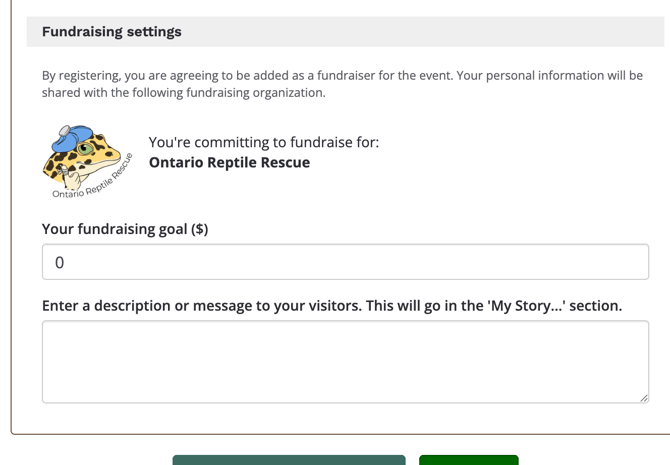
For some events, helping with fundraising efforts is an integral part of participation. An event organizer or fundraising coordinator may establish settings such that, when you enter the registration URL, an organization is already preselected for you. See screenshot below for an example.
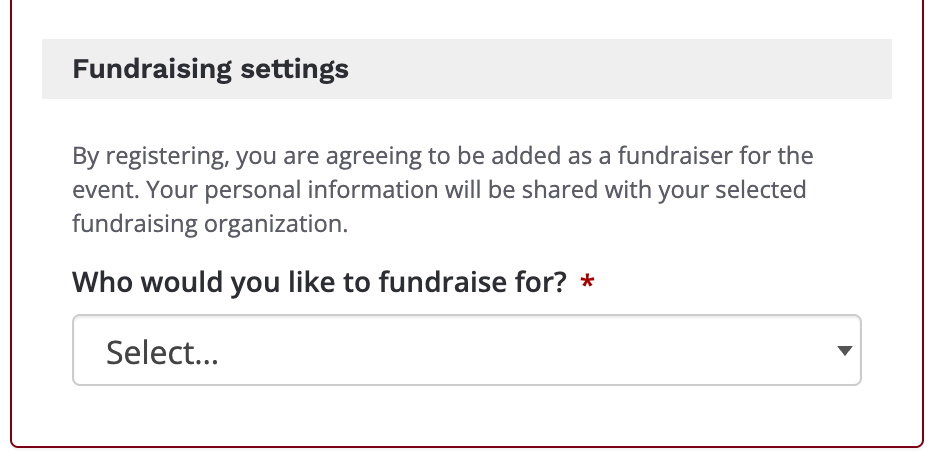
When the event has multiple partnering fundraising organizations, you may be prompted to choose one (and only one) in the field **"Who would you like to fundraise for?"** Note the red asterisk. Screenshots follow.
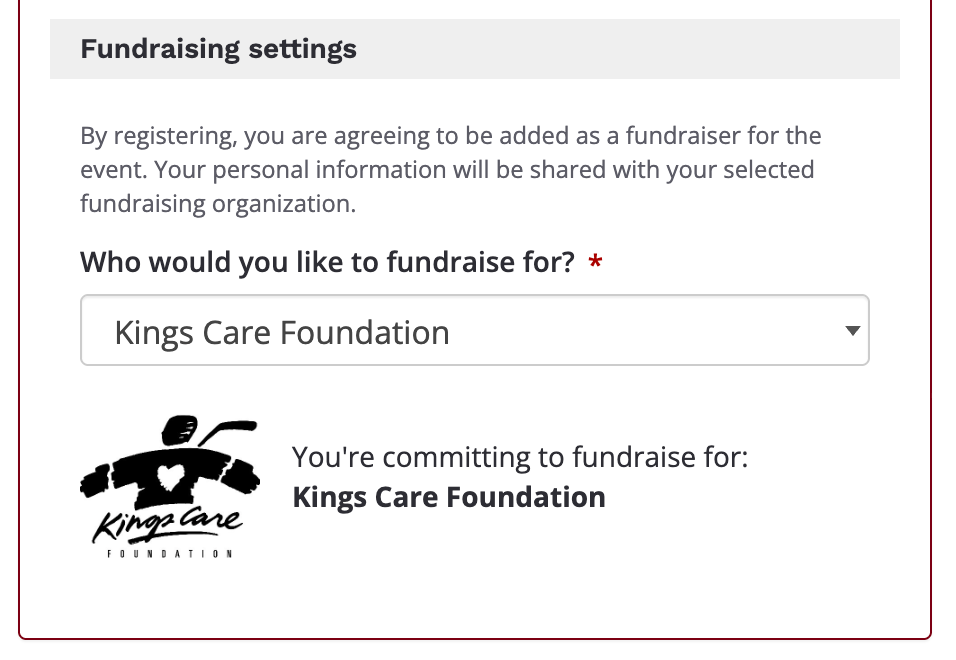
Choose the organization that you feel most passionate about, and let this motivate you into securing donations on their behalf.
The small print says *"By registering, you are agreeing to be added as a fundraiser for the event. Your personal information will be shared with the following/your selected fundraising organization."* In other words, the indicated organization can access your name and contact data for the sake of managing and bolstering their fundraising campaign.
If enabled, you may see two additional fields (optional), where you may enter your fundraising goal as a numerical value and page description all to get a head start on your fundraising page.
### B. Optional fundraising \> You opt in
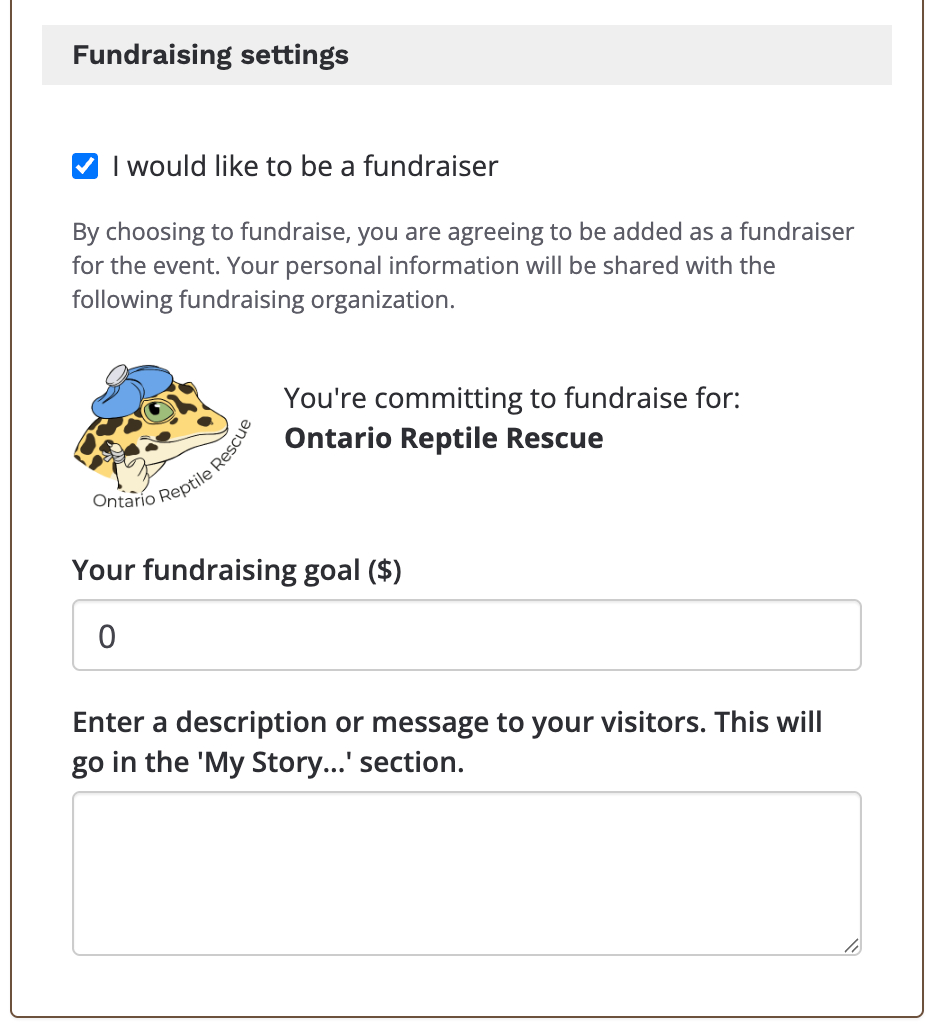
For another subset of Race Roster events, fundraising is optional. Whether you *only* want to register as a participant, or *also* want to help fundraise for a cause, is up to you. If there's only one non-profit/charity, in registration you will see a blue checkbox field titled **"I would like to be a fundraiser"** followed by the organizational information. Screenshot follows.
When the event has multiple partnering fundraising organizations, you will be prompted to choose one (and only one) in the field **"Who would you like to fundraise for?"** Note the red asterisk. Screenshots follow.
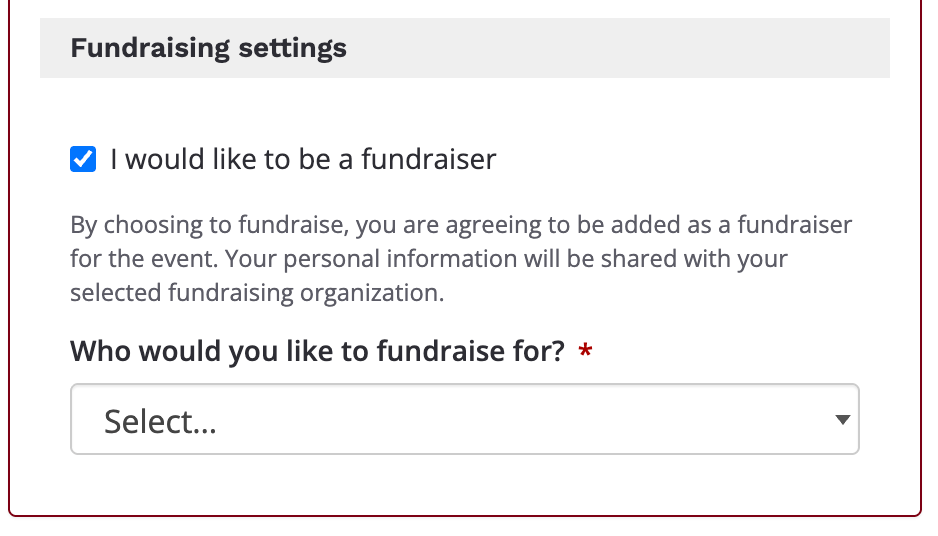
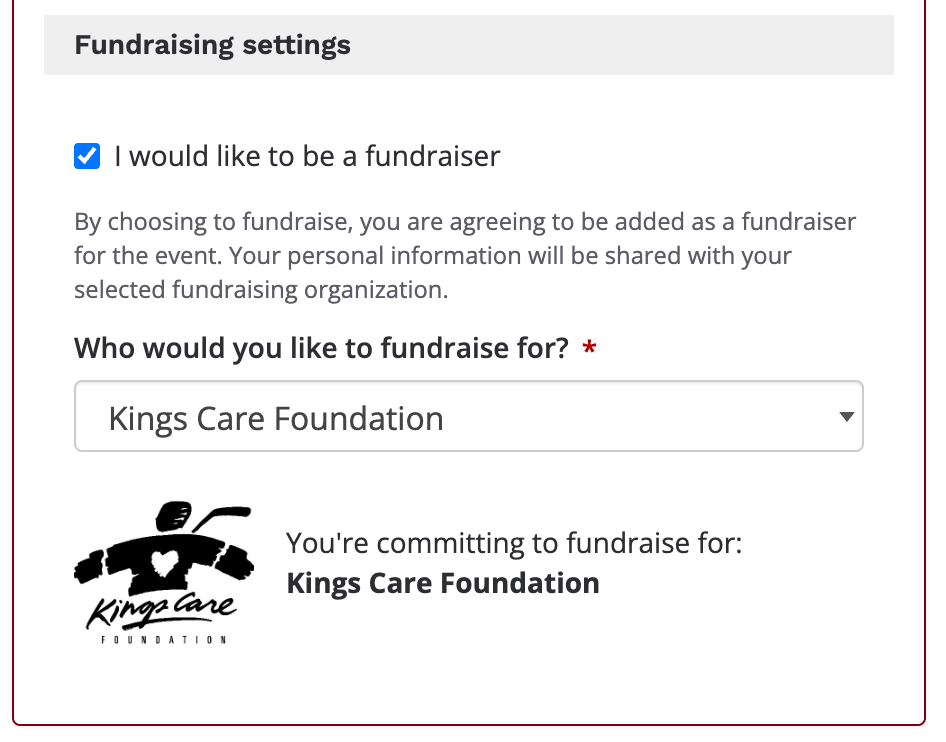
As always, choose the organization that you feel most passionate about.
The small print says *"By registering, you are agreeing to be added as a fundraiser for the event. Your personal information will be shared with the following/your selected fundraising organization."* The indicated organization can access your name and contact data for the sake of managing and bolstering their fundraising campaign.
If enabled, you may see two additional fields (optional), where you may enter your fundraising goal as a numerical value and page description all to get a head start on your fundraising page.
### C. Optional fundraising \> You opt out
If the event set fundraising as optional, and you do not want to fundraise, you may deselect the **"I would like to be a fundraiser"** blue checkbox field so that all subsequent fields and text disappear. Screenshot follows.

Perhaps you only intend to register (and pay the registration fee, if applicable) to participate on the day of the event. Perhaps you intend to make a donation, without wanting the system to generate a fundraising page with your name on it. Perhaps you don't believe you will have time to accrue donations. These are all valid reasons.
As a result of opting out, your information will not be shared with any fundraising organizations at the time that your complete registration—you will only be added to the event organizer's participant list, not to the fundraiser list.
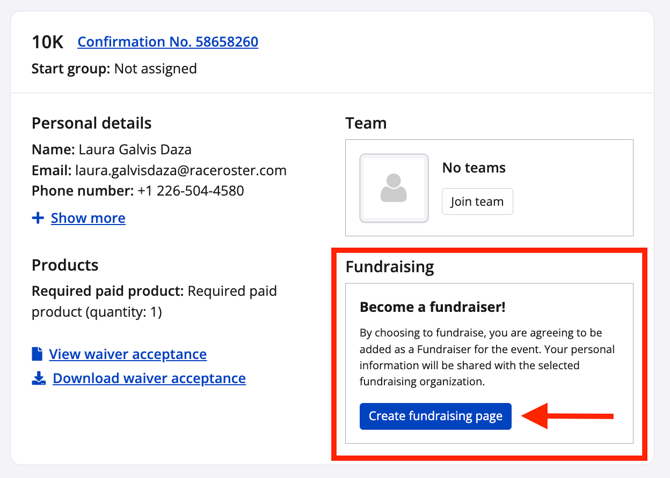
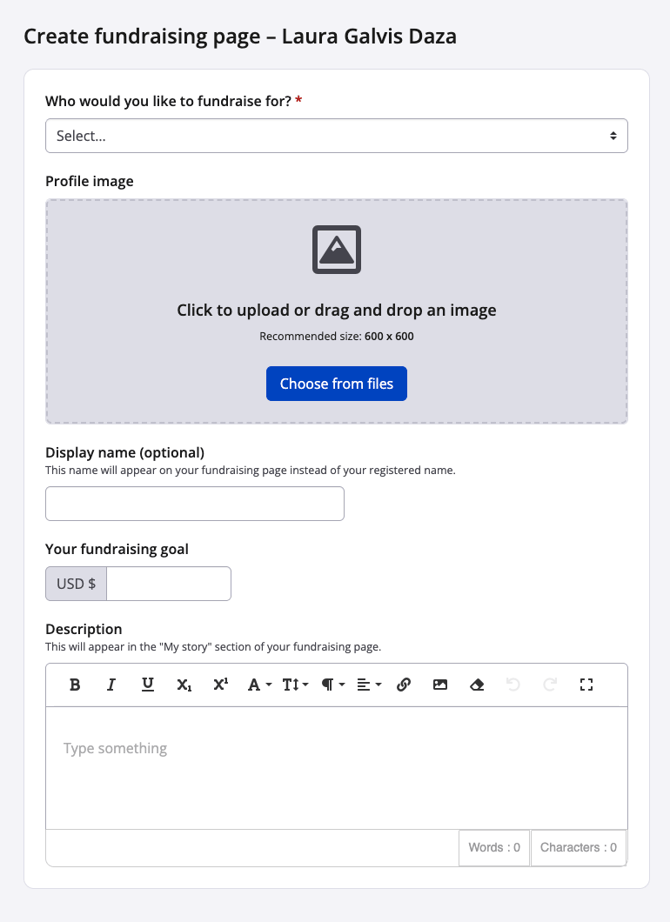
Now, if after completing registration you change your mind and do want to opt in to fundraising, there are settings in the participant dashboard. Here are the instructions:
1. Sign in to your Race Roster user account.
2. Make your way to the **participant dashboard** for your event registration.
3. Scroll down to the section **Fundraising.**
4. Click the blue **"Create fundraising page**" button.
5. On the next page, fill out the form.
6. Click "Save & exit".
- [Event Organizers and Race Directors](https://help.raceroster.com/en-us/knowledge-base/event-organizers-and-race-directors?hsLang=en-us#main-content)
- [Participant Management](https://help.raceroster.com/en-us/knowledge-base/event-organizers-and-race-directors?hsLang=en-us#participant-management)
- [Financials](https://help.raceroster.com/en-us/knowledge-base/event-organizers-and-race-directors?hsLang=en-us#financials)
- [Marketing & Promotions](https://help.raceroster.com/en-us/knowledge-base/event-organizers-and-race-directors?hsLang=en-us#marketing-promotions)
- [Email Campaigns, MailChimp Integration](https://help.raceroster.com/en-us/knowledge-base/event-organizers-and-race-directors?hsLang=en-us#email-campaigns-mailchimp-integration)
- [Products](https://help.raceroster.com/en-us/knowledge-base/event-organizers-and-race-directors?hsLang=en-us#products)
- [Team Management and Settings](https://help.raceroster.com/en-us/knowledge-base/event-organizers-and-race-directors?hsLang=en-us#team-management-and-settings)
- [Onsite App](https://help.raceroster.com/en-us/knowledge-base/event-organizers-and-race-directors?hsLang=en-us#onsite-app)
- [Registration Questions](https://help.raceroster.com/en-us/knowledge-base/event-organizers-and-race-directors?hsLang=en-us#registration-questions)
- [Fundraising Settings and Receipts](https://help.raceroster.com/en-us/knowledge-base/event-organizers-and-race-directors?hsLang=en-us#fundraising-settings-and-receipts)
- [Promo Codes, Discounts, and Gifting Codes](https://help.raceroster.com/en-us/knowledge-base/event-organizers-and-race-directors?hsLang=en-us#promo-codes-discounts-and-gifting-codes)
- [Virtual](https://help.raceroster.com/en-us/knowledge-base/event-organizers-and-race-directors?hsLang=en-us#virtual)
- [Results](https://help.raceroster.com/en-us/knowledge-base/event-organizers-and-race-directors?hsLang=en-us#results)
- [Access codes](https://help.raceroster.com/en-us/knowledge-base/event-organizers-and-race-directors?hsLang=en-us#access-codes)
- [Director Access and Settings](https://help.raceroster.com/en-us/knowledge-base/event-organizers-and-race-directors?hsLang=en-us#director-access-and-settings)
- [Pricing](https://help.raceroster.com/en-us/knowledge-base/event-organizers-and-race-directors?hsLang=en-us#pricing)
- [Event Page Settings](https://help.raceroster.com/en-us/knowledge-base/event-organizers-and-race-directors?hsLang=en-us#event-page-settings)
- [Your Dashboard](https://help.raceroster.com/en-us/knowledge-base/event-organizers-and-race-directors?hsLang=en-us#your-dashboard)
- [Sub-events](https://help.raceroster.com/en-us/knowledge-base/event-organizers-and-race-directors?hsLang=en-us#sub-events)
- [Other FAQs](https://help.raceroster.com/en-us/knowledge-base/event-organizers-and-race-directors?hsLang=en-us#other-faqs)
- [Volunteers](https://help.raceroster.com/en-us/knowledge-base/event-organizers-and-race-directors?hsLang=en-us#volunteers)
- [Create, Edit or Take Your Event Live](https://help.raceroster.com/en-us/knowledge-base/event-organizers-and-race-directors?hsLang=en-us#create-edit-or-take-your-event-live)
- [Waivers](https://help.raceroster.com/en-us/knowledge-base/event-organizers-and-race-directors?hsLang=en-us#waivers)
- [Reports](https://help.raceroster.com/en-us/knowledge-base/event-organizers-and-race-directors?hsLang=en-us#reports)
- [Participants and Fundraisers](https://help.raceroster.com/en-us/knowledge-base/participants-and-fundraisers?hsLang=en-us#main-content)
- [Participant FAQs](https://help.raceroster.com/en-us/knowledge-base/participants-and-fundraisers?hsLang=en-us#participant-faqs)
- [Fundraising](https://help.raceroster.com/en-us/knowledge-base/participants-and-fundraisers?hsLang=en-us#fundraising)
- [Gift Registrations](https://help.raceroster.com/en-us/knowledge-base/participants-and-fundraisers?hsLang=en-us#gift-registrations)
- [Sign In and Manage Registration](https://help.raceroster.com/en-us/knowledge-base/participants-and-fundraisers?hsLang=en-us#sign-in-and-manage-registration)
- [Transfer Registration](https://help.raceroster.com/en-us/knowledge-base/participants-and-fundraisers?hsLang=en-us#transfer-registration)
- [Access Codes](https://help.raceroster.com/en-us/knowledge-base/participants-and-fundraisers?hsLang=en-us#access-codes)
- [Teams](https://help.raceroster.com/en-us/knowledge-base/participants-and-fundraisers?hsLang=en-us#teams)
- [Security & Compliance](https://help.raceroster.com/en-us/knowledge-base/participants-and-fundraisers?hsLang=en-us#security-compliance)
- [Promo Codes](https://help.raceroster.com/en-us/knowledge-base/participants-and-fundraisers?hsLang=en-us#promo-codes)
- [Race Roster CRM](https://help.raceroster.com/en-us/knowledge-base/race-roster-crm?hsLang=en-us#main-content)
- [Organizations](https://help.raceroster.com/en-us/knowledge-base/race-roster-crm?hsLang=en-us#organizations)
- [Contact Management and Validation Lists](https://help.raceroster.com/en-us/knowledge-base/race-roster-crm?hsLang=en-us#contact-management-and-validation-lists)
- [Reporting](https://help.raceroster.com/en-us/knowledge-base/race-roster-crm?hsLang=en-us#reporting)
- [Events and Event Groups](https://help.raceroster.com/en-us/knowledge-base/race-roster-crm?hsLang=en-us#events-and-event-groups)
- [Campaigns and Marketing](https://help.raceroster.com/en-us/knowledge-base/race-roster-crm?hsLang=en-us#campaigns-and-marketing)
- [Non-profit Organizations](https://help.raceroster.com/en-us/knowledge-base/race-roster-crm?hsLang=en-us#non-profit-organizations)
- [Fundraising Coordinators](https://help.raceroster.com/en-us/knowledge-base/fundraising-coordinators?hsLang=en-us#main-content)
- [Resources](https://help.raceroster.com/en-us/knowledge-base/fundraising-coordinators?hsLang=en-us#resources)
- [Participant and Team Fundraising](https://help.raceroster.com/en-us/knowledge-base/fundraising-coordinators?hsLang=en-us#participant-and-team-fundraising)
- [Reporting](https://help.raceroster.com/en-us/knowledge-base/fundraising-coordinators?hsLang=en-us#reporting)
- [Timers](https://help.raceroster.com/en-us/knowledge-base/timers?hsLang=en-us#main-content)
- [Account settings](https://help.raceroster.com/en-us/knowledge-base/timers?hsLang=en-us#account-settings)
- [Results](https://help.raceroster.com/en-us/knowledge-base/timers?hsLang=en-us#results)
- [Timing Tools](https://help.raceroster.com/en-us/knowledge-base/timers?hsLang=en-us#timing-tools)
- [Bib Assignment](https://help.raceroster.com/en-us/knowledge-base/timers?hsLang=en-us#bib-assignment)
- [Participant Data and Reports](https://help.raceroster.com/en-us/knowledge-base/timers?hsLang=en-us#participant-data-and-reports)
- [The ASICS Runkeeper™ app](https://help.raceroster.com/en-us/knowledge-base/the-asics-runkeeper-app?hsLang=en-us#main-content)
- [The ASICS Runkeeper™ app](https://help.raceroster.com/en-us/knowledge-base/the-asics-runkeeper-app?hsLang=en-us#the-asics-runkeeper-app)
[](https://raceroster.com)
Copyright © 2026, Race Roster