
An event with Fundraising minimums enabled can track progress using the Fundraisers list and connect with fundraisers about their fundraising minimums.
Steps to track fundraising minimums
1. Search the menu for Management → Fundraising → Fundraisers list.
2. Within the Fundraiser list view the columns below:
- Total amount raised - Amount raised by the fundraiser
- Fundraising minimum - Amount agreed to be raised during registration
- Fundraising minimum status - If the goal has been marked as achieved
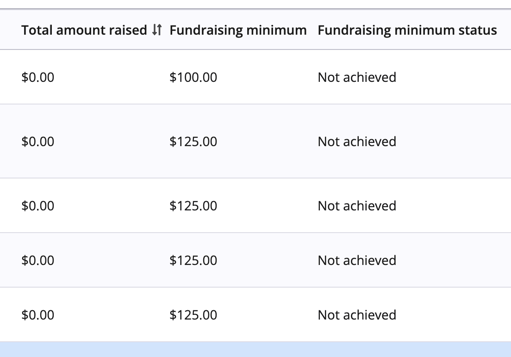
3. Select Filters on the top right of the list to assist with finding fundraisers in certain stages of fundraising. Select the Fundraising minimum status to be filtered and Apply.
Editing a Fundraiser’s Required Minimum
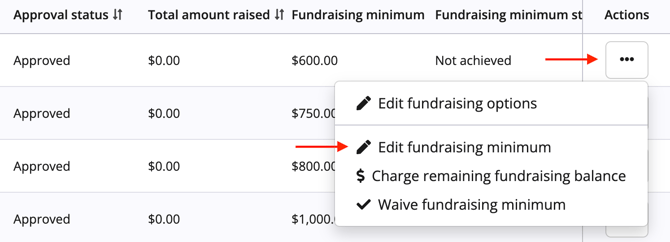
1. In the Fundraiser list, select the three dots to the right in the Actions column and select the Edit fundraising minimum option. This can only be edited to a lower amount than the fundraiser agreed to in registration.
2. Enter the lower amount and select Save minimum. This action cannot be undone or increased back to the original amount.
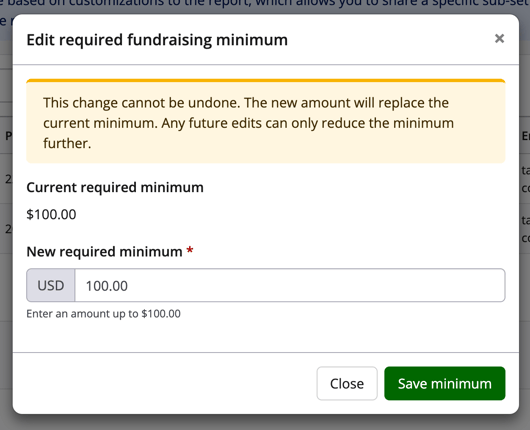
This will update on the Fundraiser list and on the participant dashboard.
Waiving a fundraising minimum
A Fundraiser’s required minimum can be waived from the Fundraisers list. This updates the fundraising minimum status and prevents the user from charging any remaining fundraising balance. This action is what should be taken if an organizer no longer wants the fundraiser to have a required minimum as a fundraising minimum cannot be edited to $0.
1. In the Fundraiser list, select the three dots to the right in the Actions column and select the Waive fundraising minimum.
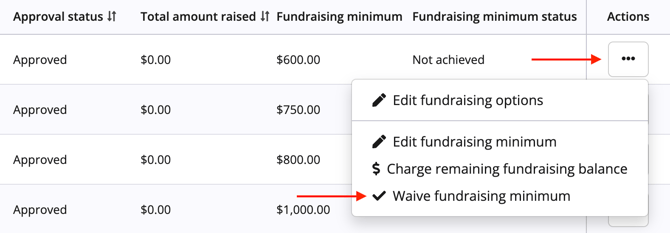
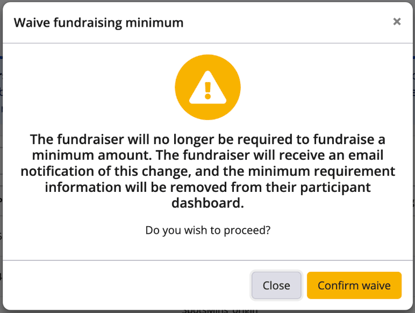
2. A confirmation modal will appear that provides the organizer with information on what occurs when waiving a minimum. To proceed, select Confirm waive. This will also send an email to the fundraiser confirming their minimum has been waived.
3. To reinstate the fundraising minimum, follow the same steps and select Undo waive fundraising minimum in the Actions column. An email will not be sent to confirm thee participant's fundraising minimum has been reinstated.
Email campaigns & merge tags
If an event organizer would like to send out reminders to fundraisers regarding their agreed minimum fundraising amounts, the email campaign tool can be used. The following merge tags are now available and can be used in the Customize step of a campaign:
- Fundraising deadline - The deadline date that was saved to the participant’s fundraising record
- Fundraising minimum - Required fundraising minimum that was saved to the participant’s fundraising record
- Fundraising remaining balance - The amount remaining to be raised for the fundraiser to achieve their fundraising minimum
Please reference the article Understanding merge tags (including a merge tag index) for more detailed instructions.
For more information on how to charge a fundraiser that has not met the minimums, please reference the article How to charge outstanding fundraising minimum balances.