
A Race Roster account allows users to securely access data regarding
- event registrations, as an event participant
- volunteer registrations, as an event volunteer
- earnings, as a promoter
- event pages, as an event organizer (including fundraising)
- timing companies, as a timer
- club pages, as a club owner
- organizations, as an organization owner
While some Race Roster pages and calls to action are public, others require that a participant or organizer signs in to grant or verify access privileges. The following steps explain how to sign in:
1. Go to any raceroster.com URL, including the landing web brochure, an event page, or an event or participant dashboard page. Locate the Sign in button in the top right-hand corner, or the Menu option with the "Sign in" link. In some cases, the user may be automatically redirected to step 2.
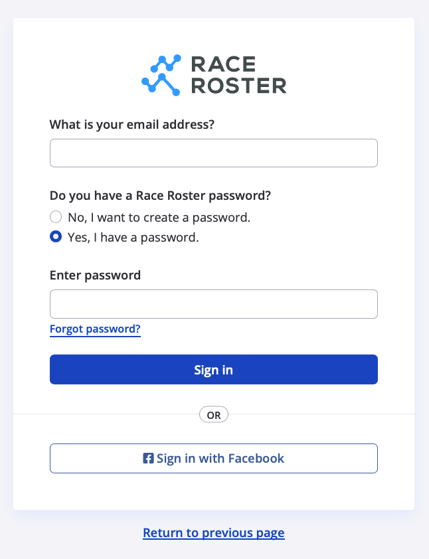
2. Once on the sign-in page, enter the account credentials (usually email address and password, but Facebook and OneASICS are also options). Be sure to select "Yes, I have a password." to indicate that the account already exists. Having trouble signing in? Learn more by reading our other article, How do I reset my lost password?
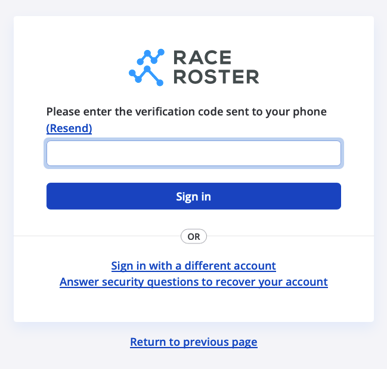
3. If an account has staff access to any events (event organizer, timer, club owner, organization owner and/or fundraising coordinator), the user will be prompted to complete the two-factor authentication (2FA) step by entering a verification code.
Non-staff access users who previously opted for enabling 2FA will also be prompted to complete this step.
4. After signing in, proceed with user-only actions. For example:
As a participant
Register for an event. If already registered, a participant visit their participant dashboard by clicking Menu followed by Dashboard under the Participant header.
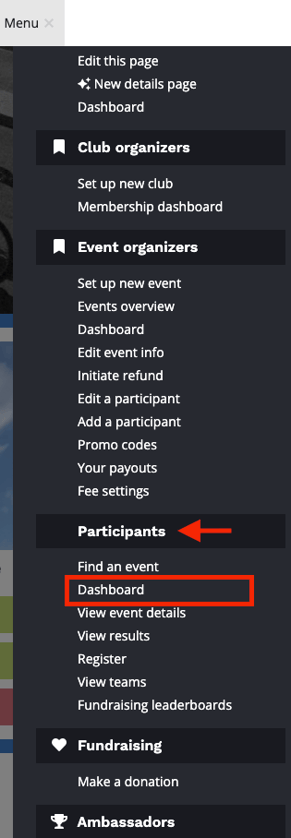
From the participant dashboard, a user can:
- access details for upcoming events
- adjust any registration information
- add an event to the ASICS Runkeeper app™
- submit virtual results
- edit a participant fundraising page
- view all transaction details and receipts
- manage pending transfer requests
Note: Not all events will require participants to sign in to register. Please reference the article How to register for an event with an email OTP (one-time passcode) verification for more information. To view/manage a registration, participants will need to sign in to their account.
As a staff-access user
An organizer can proceed to visit their event, club or organization dashboard, or to manage their timing company. From an event page, navigate from to the top right and clicking Menu followed by Your homepage.
Then, use the "RACE ROSTER" kingdom switcher on the top left to access one of the dashboards. Please reference the article How to sign in to Race Roster and access the dashboards for more information.