---
title: How to set up organizational promo codes
description: How to set up promo codes that apply to multiple events in an organization
---
[Skip to content](https://help.raceroster.com/en-us/knowledge-base/how-to-set-up-organizational-promo-codes#main-content)
[Submit a knowledge article idea](https://help.raceroster.com/en-us/knowledge-base/kb-tickets/new?hsLang=en-us)

Open main navigation
Close main navigation
- [Submit a knowledge article idea](https://help.raceroster.com/en-us/knowledge-base/kb-tickets/new)
How can we help you?
- There are no suggestions because the search field is empty.
1. [Race Roster Knowledge Base](https://help.raceroster.com/en-us/knowledge-base?hsLang=en-us)
2. [Event Organizers and Race Directors](https://help.raceroster.com/en-us/knowledge-base/event-organizers-and-race-directors?hsLang=en-us)
3. [Promo Codes, Discounts, and Gifting Codes](https://help.raceroster.com/en-us/knowledge-base/event-organizers-and-race-directors?hsLang=en-us#promo-codes-discounts-and-gifting-codes)
October 8, 2026
# How to set up organizational promo codes
Race Roster offers the ability for event organizers who have multiple events on the platform to create an overarching organization in our CRM dashboard. An organization allows a user to connect each of their individual events under one umbrella. [**Learn more about CRM organizations**](https://hubspot.raceroster.com/en-us/knowledge-base/how-to-create-an-organization-on-race-roster?hsLang=en-us).
### What are organizational promo codes and how are they used
With this feature, event organizers can also create **organizational promo codes**. This allows the organizer to create **a single promo code or group of promo codes that can be redeemed across multiple events that are part of the organization.** Organizational promo codes simplify the code creation process across numerous events with a one-time set up, while also maintaining consistency in the naming of codes across all affiliated events.
*For example, an event organzier may want to create a promo code for a loyalty contact that would allow them a 30% discount on one out of your recurring spring, summer and fall events, and let the contact redeem the promo code on the event they want. With this tool, you can set up a promo code without the hassle of asking which of the three events they will register for, or the worry that it will be redeemable beyond the intended allowance.*
### Setup
To create organizational promo codes across mutliple events on Race Roster, please follow the steps below.
1\. Create an organization in Race Roster CRM. If unsure, see the article **[How to create an organization on Race Roster](https://help.raceroster.com/en-us/knowledge-base/how-to-create-an-organization-on-race-roster?hsLang=en-us)**.
2\. Import all of the events where the promo code(s) will apply to the organization.
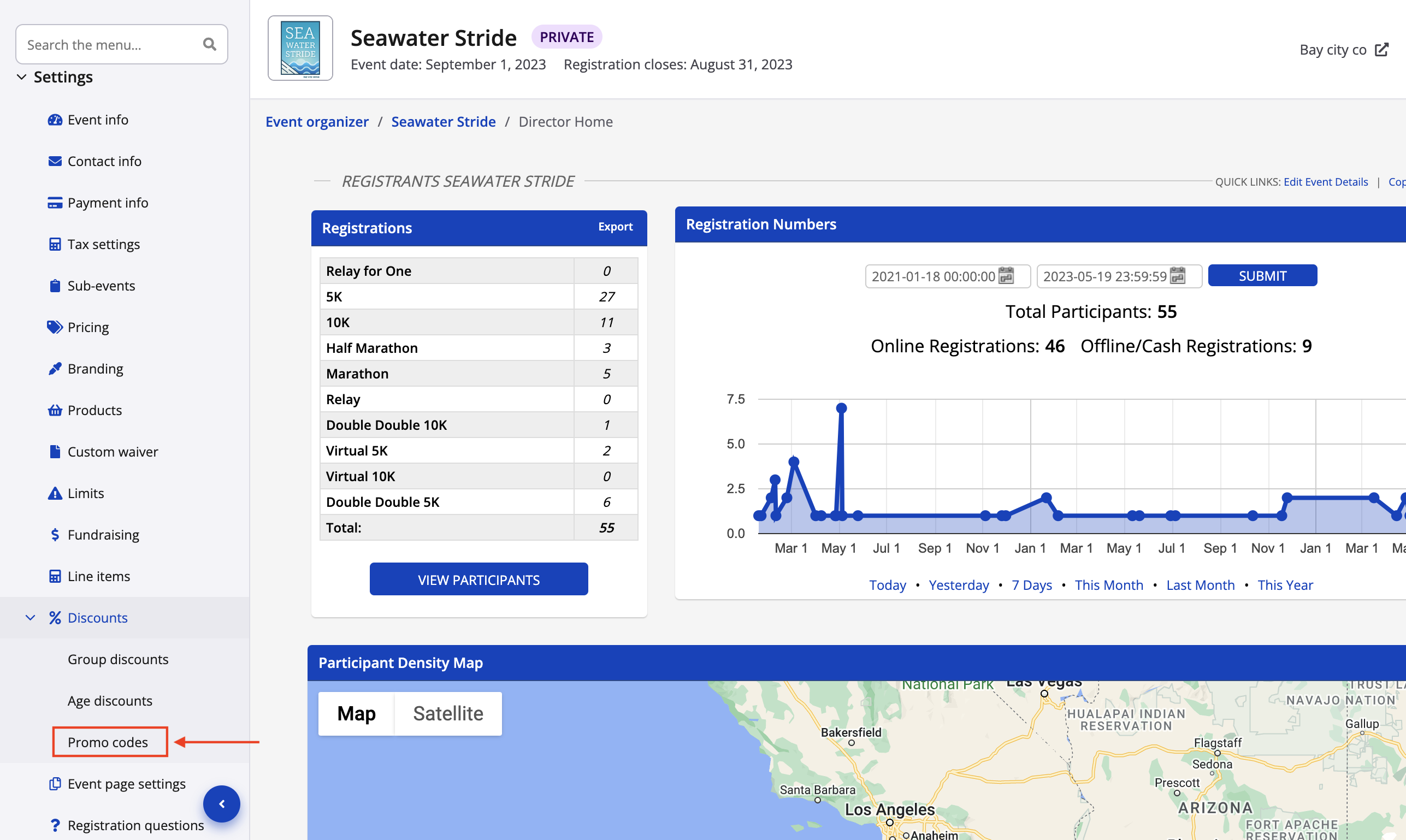
3\. Begin creating the organizational promo codes by visiting the event dashboard of one of the applicable events. Click **Settings → Discounts → Promo codes** from the lefthand menu.
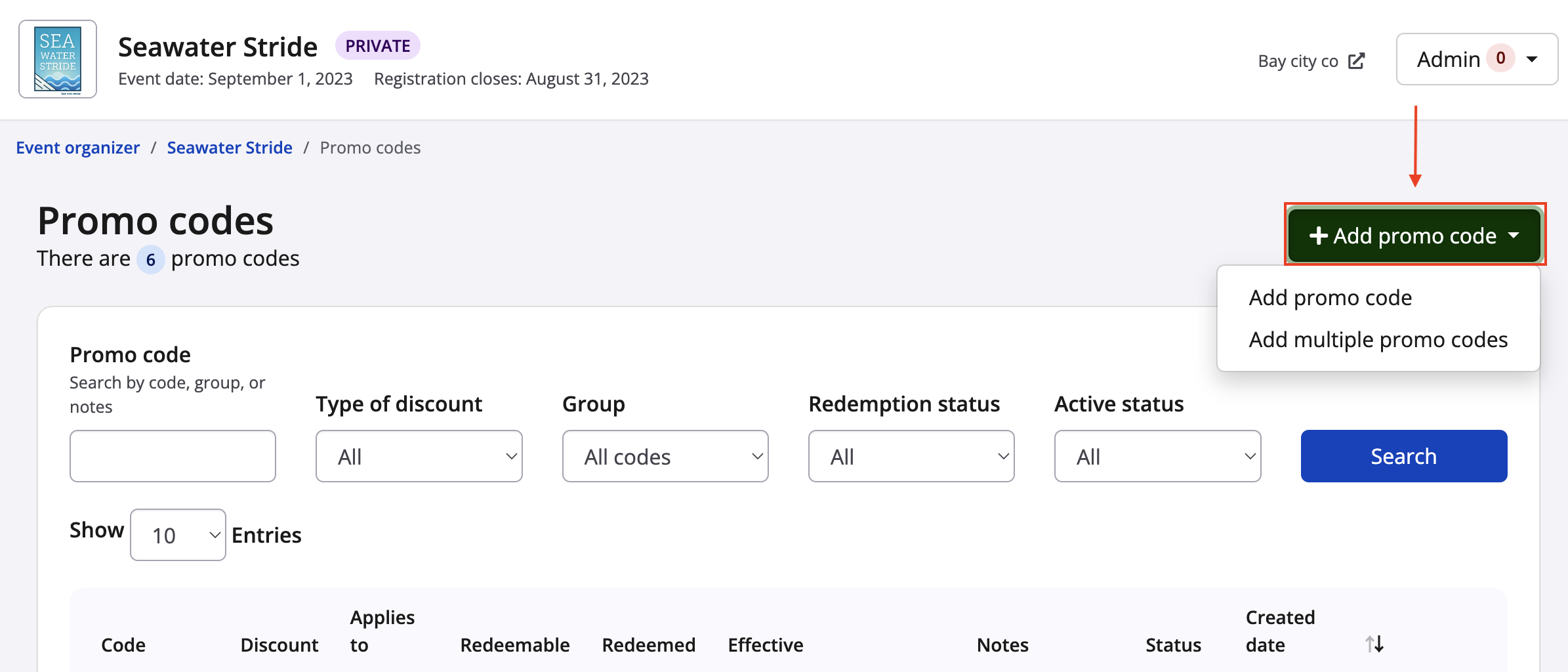
4\. From the promo code settings, click the green **Add promo code** button in the top left corner of the page and then select **Add promo code** or **Add multiple promo codes** depending on your needs.
Here is the difference:
- **Add promo code:** A single promo code may be redeemed once or several times, by the same or different users. A promo code that's only redeemable once works well for **corporate clients/special guests**, or during **troubleshooting** scenarios. A promo code that's redeemable several times works well for **flyers** or **limited time offers promoted to the public**, as it's the same code being used over and over again, possibly multiple times by the same registrant or household.
- **Add multiple promo codes:** This option works well for **bulk year-to-year deferrals** or **select participant groups**. This option allows you to set up the exact same settings simultaneously for **unique** promo codes, where the code will belong to a group. For example, an event organizer may need ten *different* promo codes where they *all* provide 50% off, apply to the 10K sub-event and are valid until September 30th. They may later download and assign the group of codes to a list, for a one-to-one ratio of promo code to intended participant.
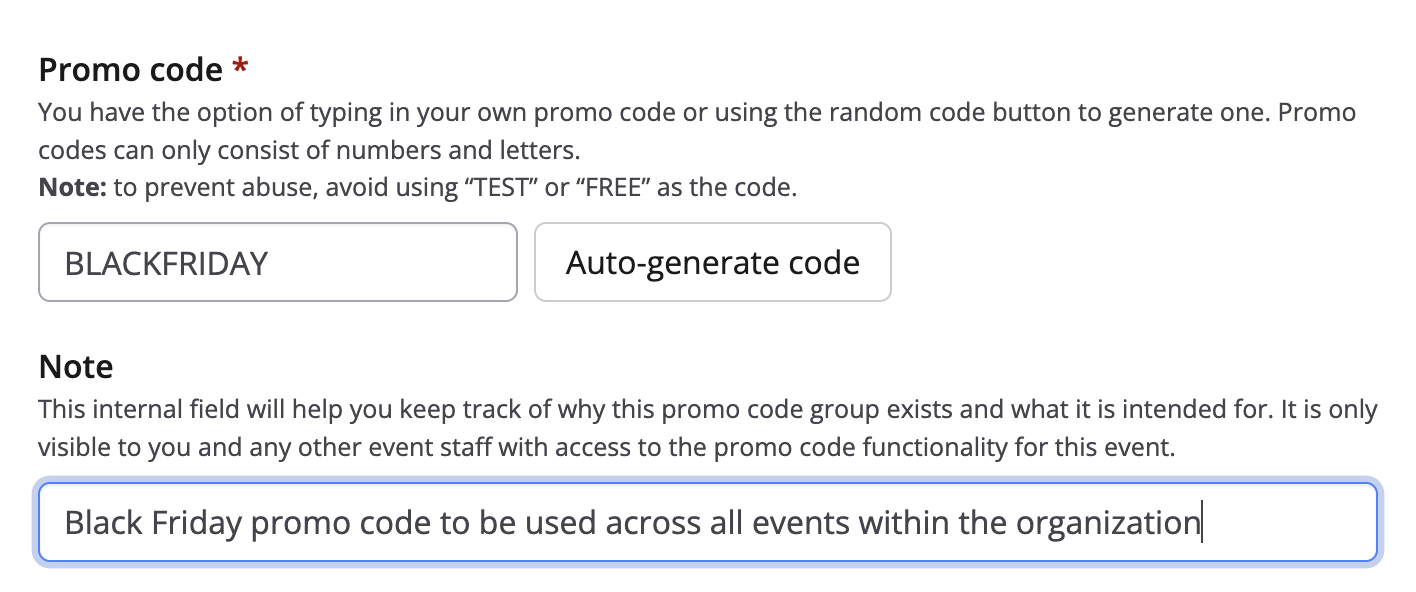
5\. Enter the following information for your promo code or promo code group:
- **Code name** (all capital letters and/or numbers) or promo code **group name** (for internal reference)
- (Promo code group only) **Number to generate**: the number of unique promo codes in the group
- **Note:** can be used as a reminder to explain why this code was originally created; only viewable internally
Screenshot follows for the single promo code creation.
6\. Select the checkbox **"Make this an organizational promo code"**. This will reveal a short, new section.
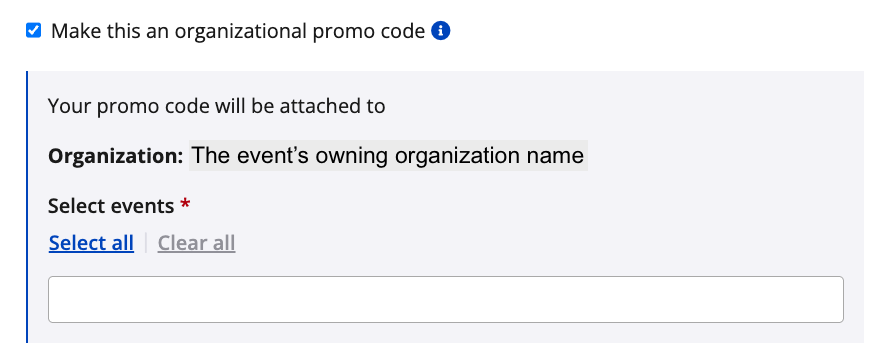
7\. Now that the event belongs to an **owning organization**, it will be listed. In the multi-choice search bar, select the events within that owning organization to make the code(s) redeemable. Currently, the system will allow an event organizer to:
- Select **all events** within the owning organization
- Hand pick events within the owning organization
8\. After configuring the code's organization settings, configure the remaining settings for the new code as follows:
- Select if the promo code should applicable for
- **Sub-event registrations**
- **Products**
- **Both**
- Under **Sub-events**, decide on which sub-events the discount code can be used (all or restrict to specific)
- Under **Discount type**, select percentage, a flat fee or set pricing
- Under **Discount amount**, add a dollar or percentage value for the discount or final price
- For **Redemption limit**, set limits on the number of times the code will be available for use
- Under **Date range**, define a timeframe using dates on the calendars in which codes can be used
- Under **Availability**, keep as active or set to inactive to disable the code
9\. Click the blue **"Save & exit"** button to save this code on all of the selected events within the organization.
**Things to note**
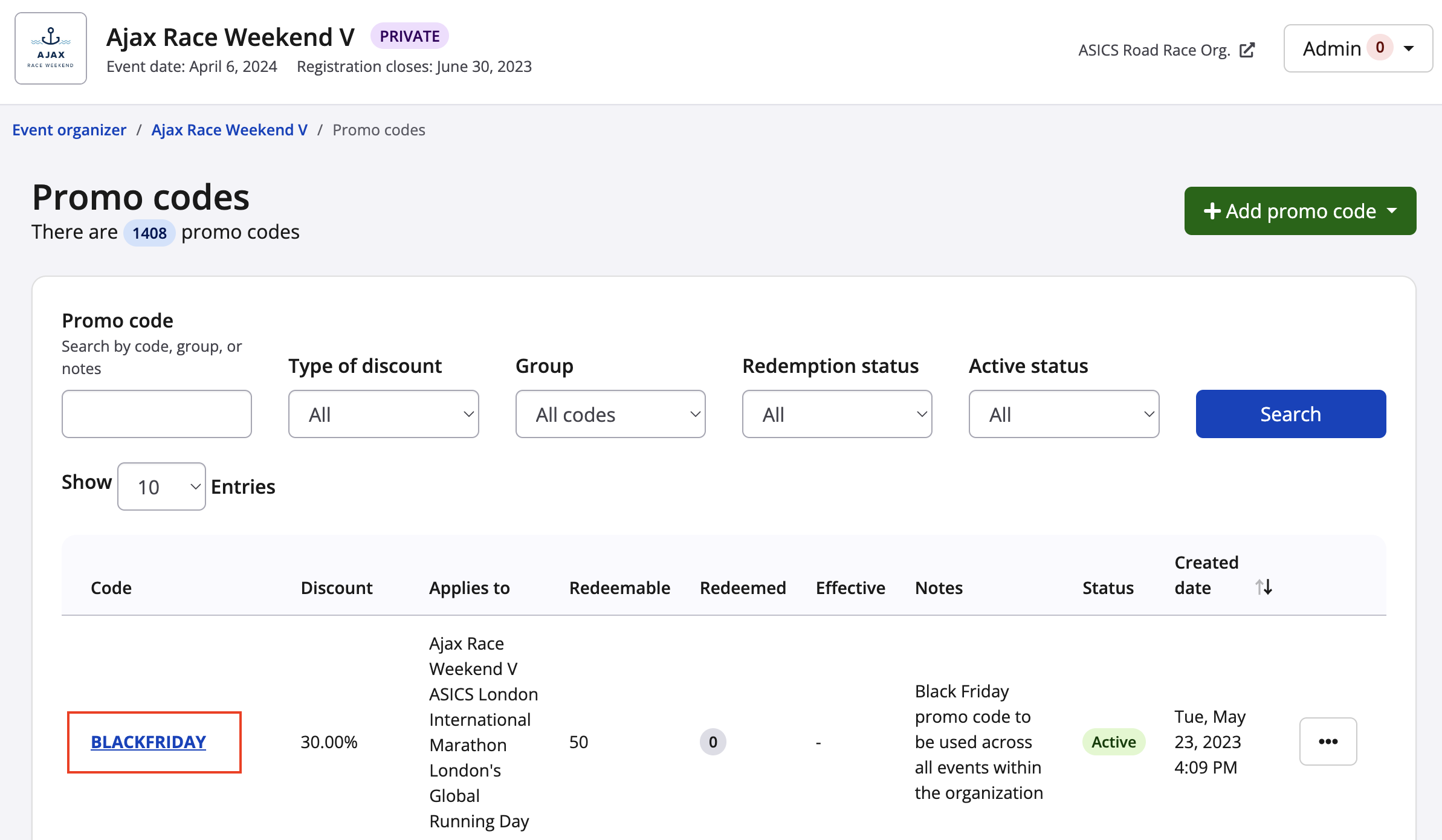
- Once an organizational promo code has been redeemed, it cannot be deleted within any of the events
- Once an organizational promo code has been redeemed on any event within the selected events group, it will have one less redemption across all applicable events
- Once an organizational promo code has been redeemed on any event within the selected events group, you will be unable to remove that event from the promo code settings
- Once an organizational promo code has been redeemed on any event within the promo code group, the promo code will become locked to that event group and cannot be associated to a new event group
- To delete a promo code group, please **[contact our team](https://raceroster.com/contact)**.
- [Event Organizers and Race Directors](https://help.raceroster.com/en-us/knowledge-base/event-organizers-and-race-directors?hsLang=en-us#main-content)
- [Participant Management](https://help.raceroster.com/en-us/knowledge-base/event-organizers-and-race-directors?hsLang=en-us#participant-management)
- [Financials](https://help.raceroster.com/en-us/knowledge-base/event-organizers-and-race-directors?hsLang=en-us#financials)
- [Marketing & Promotions](https://help.raceroster.com/en-us/knowledge-base/event-organizers-and-race-directors?hsLang=en-us#marketing-promotions)
- [Email Campaigns, MailChimp Integration](https://help.raceroster.com/en-us/knowledge-base/event-organizers-and-race-directors?hsLang=en-us#email-campaigns-mailchimp-integration)
- [Products](https://help.raceroster.com/en-us/knowledge-base/event-organizers-and-race-directors?hsLang=en-us#products)
- [Team Management and Settings](https://help.raceroster.com/en-us/knowledge-base/event-organizers-and-race-directors?hsLang=en-us#team-management-and-settings)
- [Onsite App](https://help.raceroster.com/en-us/knowledge-base/event-organizers-and-race-directors?hsLang=en-us#onsite-app)
- [Registration Questions](https://help.raceroster.com/en-us/knowledge-base/event-organizers-and-race-directors?hsLang=en-us#registration-questions)
- [Fundraising Settings and Receipts](https://help.raceroster.com/en-us/knowledge-base/event-organizers-and-race-directors?hsLang=en-us#fundraising-settings-and-receipts)
- [Promo Codes, Discounts, and Gifting Codes](https://help.raceroster.com/en-us/knowledge-base/event-organizers-and-race-directors?hsLang=en-us#promo-codes-discounts-and-gifting-codes)
- [Virtual](https://help.raceroster.com/en-us/knowledge-base/event-organizers-and-race-directors?hsLang=en-us#virtual)
- [Results](https://help.raceroster.com/en-us/knowledge-base/event-organizers-and-race-directors?hsLang=en-us#results)
- [Access codes](https://help.raceroster.com/en-us/knowledge-base/event-organizers-and-race-directors?hsLang=en-us#access-codes)
- [Director Access and Settings](https://help.raceroster.com/en-us/knowledge-base/event-organizers-and-race-directors?hsLang=en-us#director-access-and-settings)
- [Pricing](https://help.raceroster.com/en-us/knowledge-base/event-organizers-and-race-directors?hsLang=en-us#pricing)
- [Event Page Settings](https://help.raceroster.com/en-us/knowledge-base/event-organizers-and-race-directors?hsLang=en-us#event-page-settings)
- [Your Dashboard](https://help.raceroster.com/en-us/knowledge-base/event-organizers-and-race-directors?hsLang=en-us#your-dashboard)
- [Sub-events](https://help.raceroster.com/en-us/knowledge-base/event-organizers-and-race-directors?hsLang=en-us#sub-events)
- [Other FAQs](https://help.raceroster.com/en-us/knowledge-base/event-organizers-and-race-directors?hsLang=en-us#other-faqs)
- [Volunteers](https://help.raceroster.com/en-us/knowledge-base/event-organizers-and-race-directors?hsLang=en-us#volunteers)
- [Create, Edit or Take Your Event Live](https://help.raceroster.com/en-us/knowledge-base/event-organizers-and-race-directors?hsLang=en-us#create-edit-or-take-your-event-live)
- [Waivers](https://help.raceroster.com/en-us/knowledge-base/event-organizers-and-race-directors?hsLang=en-us#waivers)
- [Reports](https://help.raceroster.com/en-us/knowledge-base/event-organizers-and-race-directors?hsLang=en-us#reports)
- [Participants and Fundraisers](https://help.raceroster.com/en-us/knowledge-base/participants-and-fundraisers?hsLang=en-us#main-content)
- [Participant FAQs](https://help.raceroster.com/en-us/knowledge-base/participants-and-fundraisers?hsLang=en-us#participant-faqs)
- [Fundraising](https://help.raceroster.com/en-us/knowledge-base/participants-and-fundraisers?hsLang=en-us#fundraising)
- [Gift Registrations](https://help.raceroster.com/en-us/knowledge-base/participants-and-fundraisers?hsLang=en-us#gift-registrations)
- [Sign In and Manage Registration](https://help.raceroster.com/en-us/knowledge-base/participants-and-fundraisers?hsLang=en-us#sign-in-and-manage-registration)
- [Transfer Registration](https://help.raceroster.com/en-us/knowledge-base/participants-and-fundraisers?hsLang=en-us#transfer-registration)
- [Access Codes](https://help.raceroster.com/en-us/knowledge-base/participants-and-fundraisers?hsLang=en-us#access-codes)
- [Teams](https://help.raceroster.com/en-us/knowledge-base/participants-and-fundraisers?hsLang=en-us#teams)
- [Security & Compliance](https://help.raceroster.com/en-us/knowledge-base/participants-and-fundraisers?hsLang=en-us#security-compliance)
- [Promo Codes](https://help.raceroster.com/en-us/knowledge-base/participants-and-fundraisers?hsLang=en-us#promo-codes)
- [Race Roster CRM](https://help.raceroster.com/en-us/knowledge-base/race-roster-crm?hsLang=en-us#main-content)
- [Organizations](https://help.raceroster.com/en-us/knowledge-base/race-roster-crm?hsLang=en-us#organizations)
- [Contact Management and Validation Lists](https://help.raceroster.com/en-us/knowledge-base/race-roster-crm?hsLang=en-us#contact-management-and-validation-lists)
- [Reporting](https://help.raceroster.com/en-us/knowledge-base/race-roster-crm?hsLang=en-us#reporting)
- [Events and Event Groups](https://help.raceroster.com/en-us/knowledge-base/race-roster-crm?hsLang=en-us#events-and-event-groups)
- [Campaigns and Marketing](https://help.raceroster.com/en-us/knowledge-base/race-roster-crm?hsLang=en-us#campaigns-and-marketing)
- [Non-profit Organizations](https://help.raceroster.com/en-us/knowledge-base/race-roster-crm?hsLang=en-us#non-profit-organizations)
- [Fundraising Coordinators](https://help.raceroster.com/en-us/knowledge-base/fundraising-coordinators?hsLang=en-us#main-content)
- [Resources](https://help.raceroster.com/en-us/knowledge-base/fundraising-coordinators?hsLang=en-us#resources)
- [Participant and Team Fundraising](https://help.raceroster.com/en-us/knowledge-base/fundraising-coordinators?hsLang=en-us#participant-and-team-fundraising)
- [Reporting](https://help.raceroster.com/en-us/knowledge-base/fundraising-coordinators?hsLang=en-us#reporting)
- [Timers](https://help.raceroster.com/en-us/knowledge-base/timers?hsLang=en-us#main-content)
- [Account settings](https://help.raceroster.com/en-us/knowledge-base/timers?hsLang=en-us#account-settings)
- [Results](https://help.raceroster.com/en-us/knowledge-base/timers?hsLang=en-us#results)
- [Timing Tools](https://help.raceroster.com/en-us/knowledge-base/timers?hsLang=en-us#timing-tools)
- [Bib Assignment](https://help.raceroster.com/en-us/knowledge-base/timers?hsLang=en-us#bib-assignment)
- [Participant Data and Reports](https://help.raceroster.com/en-us/knowledge-base/timers?hsLang=en-us#participant-data-and-reports)
- [The ASICS Runkeeper™ app](https://help.raceroster.com/en-us/knowledge-base/the-asics-runkeeper-app?hsLang=en-us#main-content)
- [The ASICS Runkeeper™ app](https://help.raceroster.com/en-us/knowledge-base/the-asics-runkeeper-app?hsLang=en-us#the-asics-runkeeper-app)
[](https://raceroster.com)
Copyright © 2026, Race Roster