
When registering for an event that uses an email OTP (one-time passcode) verification, a 6-digit code is sent to the registrant's inbox to verify their email address. Entering a password or verifying an account is not required in the registration form.
1. Select the Register button on the event page.
2. Choose the sub-event and enter the email address for the registration, then select Send code.
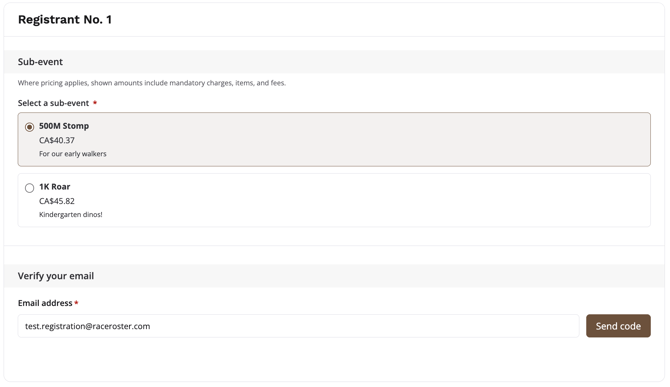
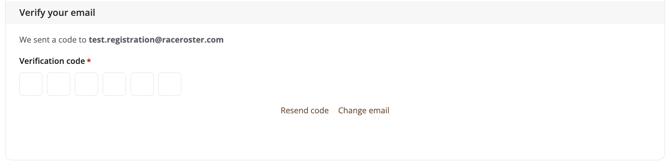
3. An email will be sent with the verification code that will need to be entered in the registration form.
4. Complete the Personal information section and select the applicable "Who are you registering?" option:
- Myself - If that email matches an existing Race Roster account, the participant's personal information will be autofilled and ready to review
- Someone else - The participant will confirm their own identity first and then add the information for the participant they are registering, or select from a saved list of participants they've previously registered
5. Continue through the registration form and complete all required fields. Select Next: Agreements to proceed or Add another registrant if needed.
Note: By selecting Sign in at the top right of an event page, an unclaimed registration for that event with the same email address will automatically claim the registration to the participant's account.
FAQs
Why do I have to verify my email to register?
This replaces the old password login requirement, making registration faster and ensuring your email address is correct.
I'm not receiving a code, the page looks broken
- Did you check your spam or junk folder? The existing code expires in 10 minutes. After 10 minutes, you will need to select Resend code.
- Failure to receive a code will auto-fallback to guest checkout.
I've typed in the verification incorrectly, can I still register?
- After failing the verification 5 times, you can continue as a guest.
I registered my kid/teammate under my email — why can't they log in?
- The registration is associated to the verified email used to register. If the email of the participant you registered was not collected, they have no self-serve claim path and you can manage this registration. The email address for the registration can be manually updated after.
- After registering for 'Someone else' and entering their email, the registrant can sign in and view the registration. No event claim is needed.
Did my old registrations disappear?
- Previous registrations are not deleted. Sign in with OTP using the exact original email on that event's page — a match claims the registration automatically!
Can I still use a password?
- An email OTP verification is the only method in the registration form.
For additional assistance registering, please contact our team.