
Donations can be made to fundraising organizations that are linked to an event page. This article outlines relevant resources on how a fundraising coordinator can set up their organization to be able to accept fundraising revenue on the platform. The recommended steps to get started are as follows:
1. Create a non-profit organization
A non-profit organization will first need to be created in the CRM. The non-profit details and payment information will be added, allowing for events to link the organization and accept donations.
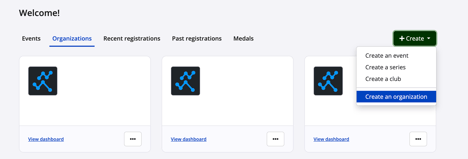
Please reference the article How to create a Non-profit Organization.
2. Link the organization
The Org ID is found at the top of the CRM dashboard and can be provided to event organizers to link the organization to their event. This will add the organization in the Fundraising settings of an event and can allow the fundraising organization to be displayed on the event page.
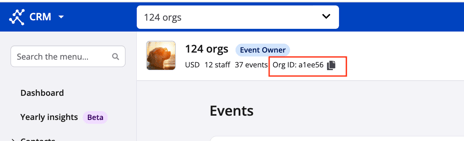
Please reference the article How to link a Non-profit Organization with an event.
3. Request event access
Once your organization is linked as a fundraising organization for an event, it will be listed in the Events setting in the CRM dashboard. This setting displays all events associated with the non-profit organization. This does not automatically provide organization staff the access to view the event dashboard for each event listed.
To request to view the event dashboard and reports related to a specific event (i.e. donation reports, payout reports, etc.), the non-profit organization staff will need to reach out directly to an organizer with full control staff access to the event. An event organizer is able to provide Fundraising coordinator staff access to an event if needed.
If staff access to an event is provided, the Fundraising Coordinators Resources will provide more details on what a Fundraising coordinator can update per event.
For additional assistance getting started as a new fundraising coordinator or non-profit organization, please contact our team.