
If an event has Fundraising minimums enabled, the participant will be required to fundraise a minimum amount for a charity. If a fundraiser does not raise enough to meet the minimum by a set date, they agree to have their credit card charged the difference between the minimum and the amount raised.
This setting will first need to be enabled for the event to allow fundraising organizations to set a fundraising minimum. Please reference the article How to enable fundraising minimums for an event or contact the event organizer to request to enable this feature.
Steps to enable fundraising minimums for a charity
1. Search the menu for Settings → Fundraising.
2. Select the three dots in the Actions column next to the fundraising organization and Edit.
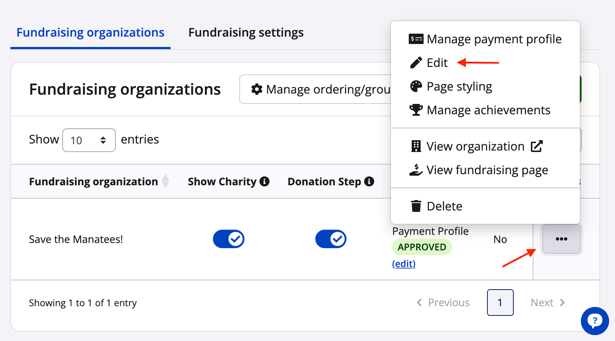
3. In the fundraising organization's settings, scroll down to Fundraising minimums and enable Require fundraising minimums. If an event level minimum was added, fundraising organizations do not need to configure their own, however have the option to raise the amount or shorten the deadline for their organization.
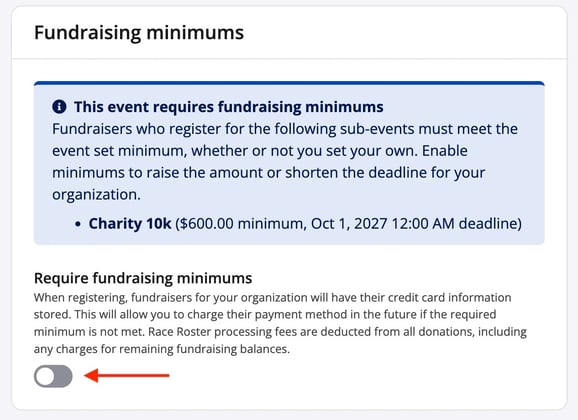
Note: Turning off the charity level fundraising minimum toggle does not affect fundraisers created prior to disabling, only new fundraisers. It also does not prevent the fundraising organization from charging fundraising minimum balances or affect event level required minimums.
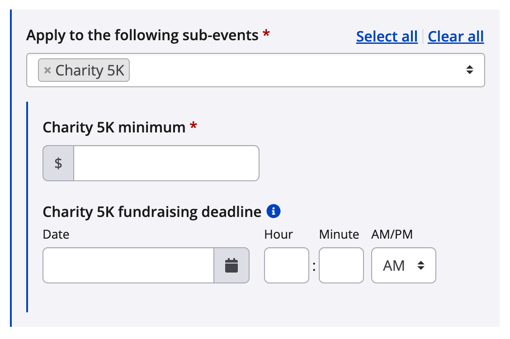
4. Once enabled, select which sub-events the fundraising minimums will apply to. For each sub-event added, set the minimum amount that needs to be raised and an optional deadline. The deadline setting is display only and will appear on pages such as registration and the participant dashboard.
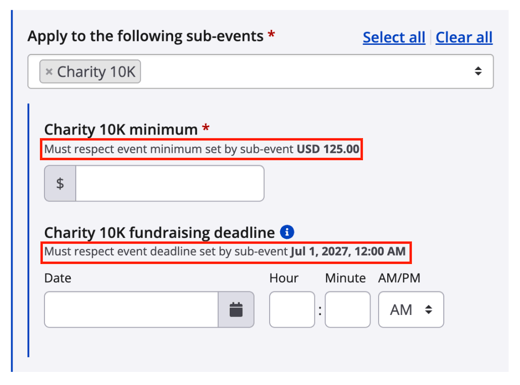
If an event-level minimum and deadline have been set, it will be displayed and validated for the minimum amount inputted.
5. Complete the minimums and optional deadline for each sub-event required and select Save at the bottom of the page.
When a participants registers and selects the fundraising organization & sub-event this has been enabled for, the participant will agree to have their credit card information saved at the checkout step, the minimum will save to their fundraising record, and their credit card can be charged from the Fundraisers list.
For the next steps after enabling fundraising minimums, please visit the articles How to charge outstanding fundraising minimum balances and How to track & manage fundraiser progress towards required fundraising minimums.