---
title: How do I create an SMS Campaign and collect Subscriber Opt-Ins?
description: Learn how to create SMS campaigns, manage credits, and collect SMS subscribers in Race Roster for event updates, race reminders, and results sharing.
---
[Skip to content](https://help.raceroster.com/en-us/knowledge-base/how-to-create-an-sms-campaign#main-content)
[Submit a knowledge article idea](https://help.raceroster.com/en-us/knowledge-base/kb-tickets/new?hsLang=en-us)

Open main navigation
Close main navigation
- [Submit a knowledge article idea](https://help.raceroster.com/en-us/knowledge-base/kb-tickets/new)
How can we help you?
- There are no suggestions because the search field is empty.
1. [Race Roster Knowledge Base](https://help.raceroster.com/en-us/knowledge-base?hsLang=en-us)
2. [Timers](https://help.raceroster.com/en-us/knowledge-base/timers?hsLang=en-us)
3. [Timing Tools](https://help.raceroster.com/en-us/knowledge-base/timers?hsLang=en-us#timing-tools)
April 29, 2026
# How do I create an SMS Campaign and collect Subscriber Opt-Ins?
Race Roster enables Event Organizers to create and send SMS campaigns to subscribed participants via text message. This tool is ideal for delivering important event updates before race day, sharing key announcements, and distributing results links or follow-up communications after the event.
For additional guidance on credit management, refer to the relevant knowledge base articles on **[How do I purchase and share SMS text credits?](https://help.raceroster.com/en-us/knowledge-base/how-to-purchase-text-messaging-credits?hsLang=en-us)**
---
### Creating an SMS Campaign
1\. Log in to the **[Timer Dashboard](https://timer.raceroster.com/)**
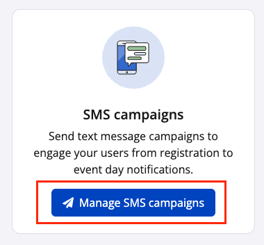
2\. Select **Messages** from the left hand sidebar and choose **Manage SMS Campaigns**
****
3\. Select **Manage Campaigns** for the specific event from which the SMS campaign will be sent.
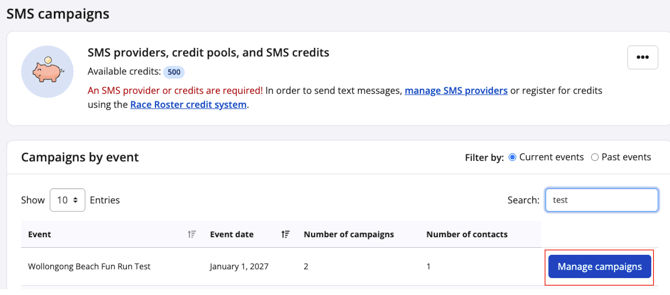
**Note:** Only participants who have actively subscribed and opted in to receive SMS communications can be contacted using this tool.
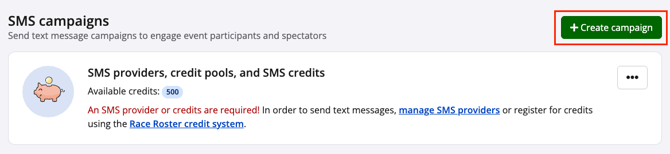
4\. Click **Create campaign**
****
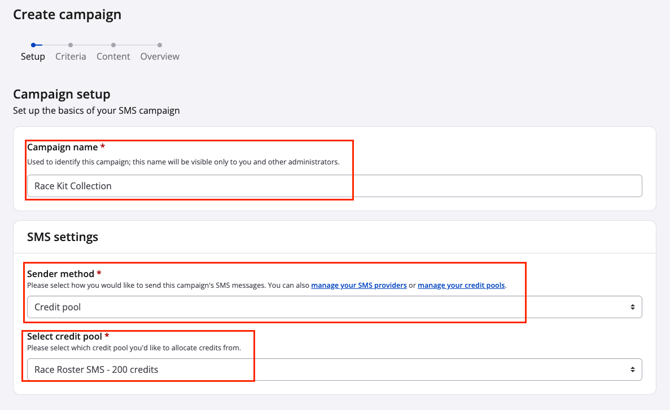
5. **Campaign setup:** Enter a name for the campaign and choose the **Sender Method**. The Sender Method references the [pre-purchased credit pool](https://help.raceroster.com/en-us/knowledge-base/how-to-purchase-text-messaging-credits?hsLang=en-us) or SMS provider ([Twilio](https://help.raceroster.com/en-us/knowledge-base/how-do-i-integrate-twilio-with-race-roster?hsLang=en-us)) integration.
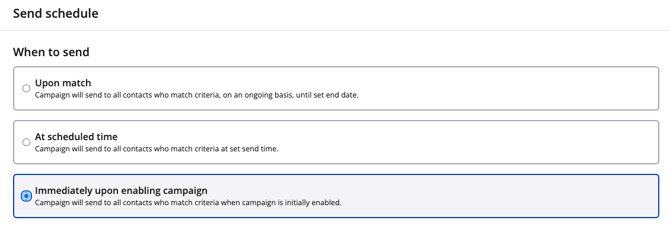
6. **Campaign criteria:** This is where the campaign’s send schedule, filters, and triggers are configured. Event Organizers can choose from three send schedule options:
- Upon match: The campaign sends automatically to all contacts who meet the selected criteria on an ongoing basis until the specified end date.
- At scheduled time: The campaign sends to all qualifying contacts at a predetermined date and time.
- Immediately upon enabling campaign:The campaign sends to all qualifying contacts as soon as the campaign is activated.
During this step, appropriate send dates and end dates should also be selected based on the campaign’s objectives.
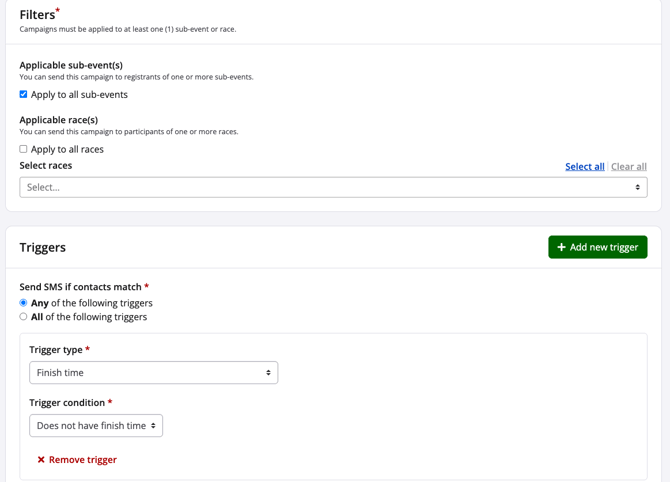
7\. Next,**Filters** and **Triggers** are configured.
Filters determine which participants are eligible to receive the campaign based on selected sub-events and/or races. Races refer to results sets created within the Results dashboard.
Triggers determine which participant action or result will initiate the SMS send. Available trigger options include:
- Finish time
- Challenge progress
- Segment performance, including segment place, segment race, or split time.
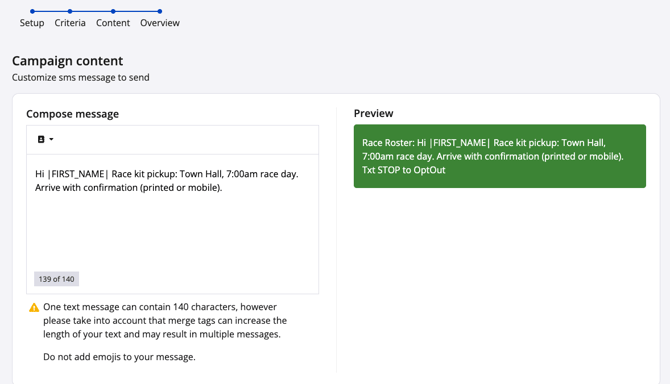
8\. **Campaign content:** The next step is Content, where the SMS message is created and customized. During this stage, Event Organizers can compose the campaign message and use merge tags to personalize content for each participant.
Important considerations:
- Each SMS message has a maximum limit of 140 characters. **Note:** Txt STOP to OptOut is automatically included in character count.
- Merge tags may increase message length, which can result in multiple SMS messages being sent
- Emojis should not be included, as they may cause message delivery or display issues
Once the message content is complete, click **Save** or **Save & Continue** to proceed.
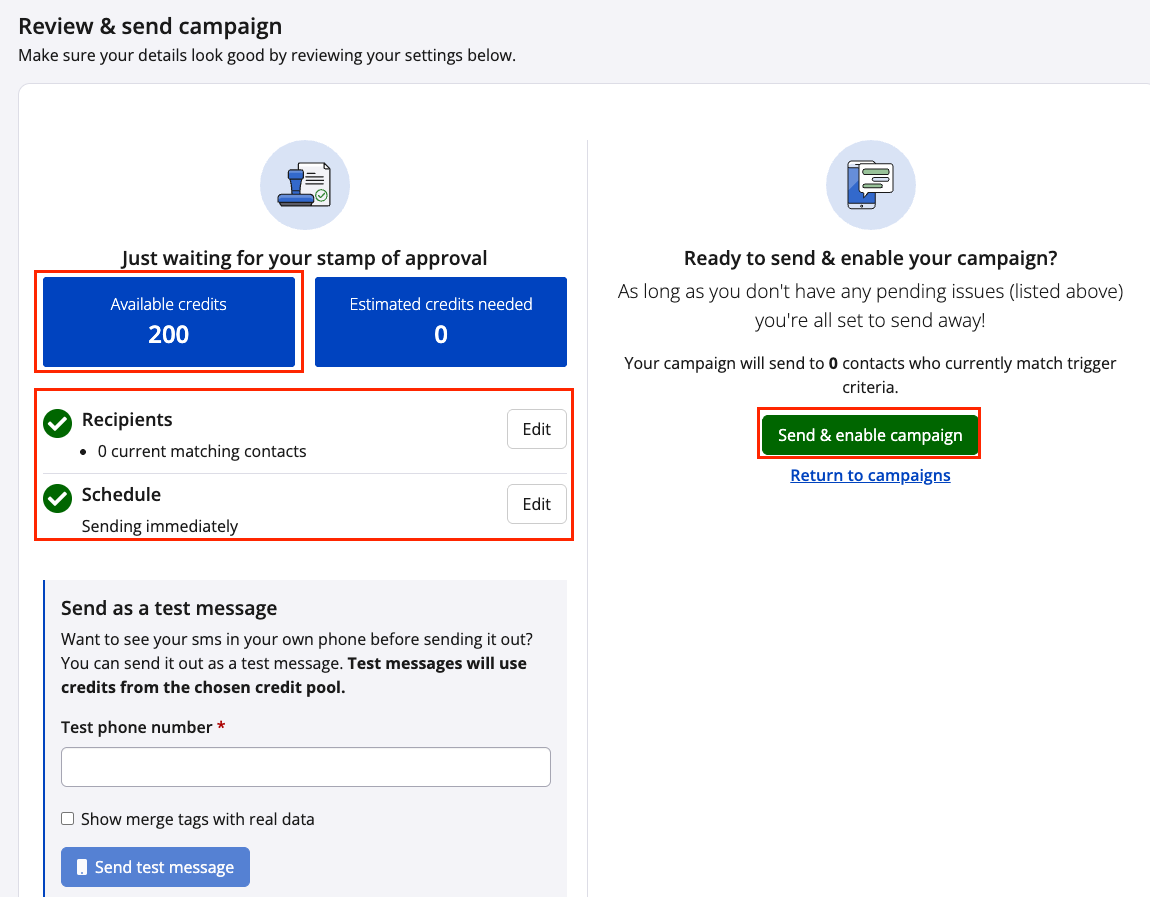
9. **Review & send campaign:** The final step is **Overview**, where all campaign settings can be reviewed before activation. During this stage, Event Organizers can:
- Review campaign details displayed on the left-hand side
- Identify any incomplete steps or configuration errors
- Confirm available SMS credits
- Send a test message for final verification (test messages will consume available credits)
Once the campaign has been reviewed and confirmed, click **Send & enable campaign** to activate and distribute the SMS campaign.
---
### How to collect SMS subscribers
**Collecting subscribers in registration:**
1\. Log in to the Race Roster dashboard as an **[Event Organizer](https://raceroster.com/)**.
2\. From the left-hand navigation menu, use the search bar to locate and select **Registration Questions** under **Settings**.
3\. Click **Add questiona** for the SMS Opt-In Question to enable SMS subscription for participantsn in the registration flow.
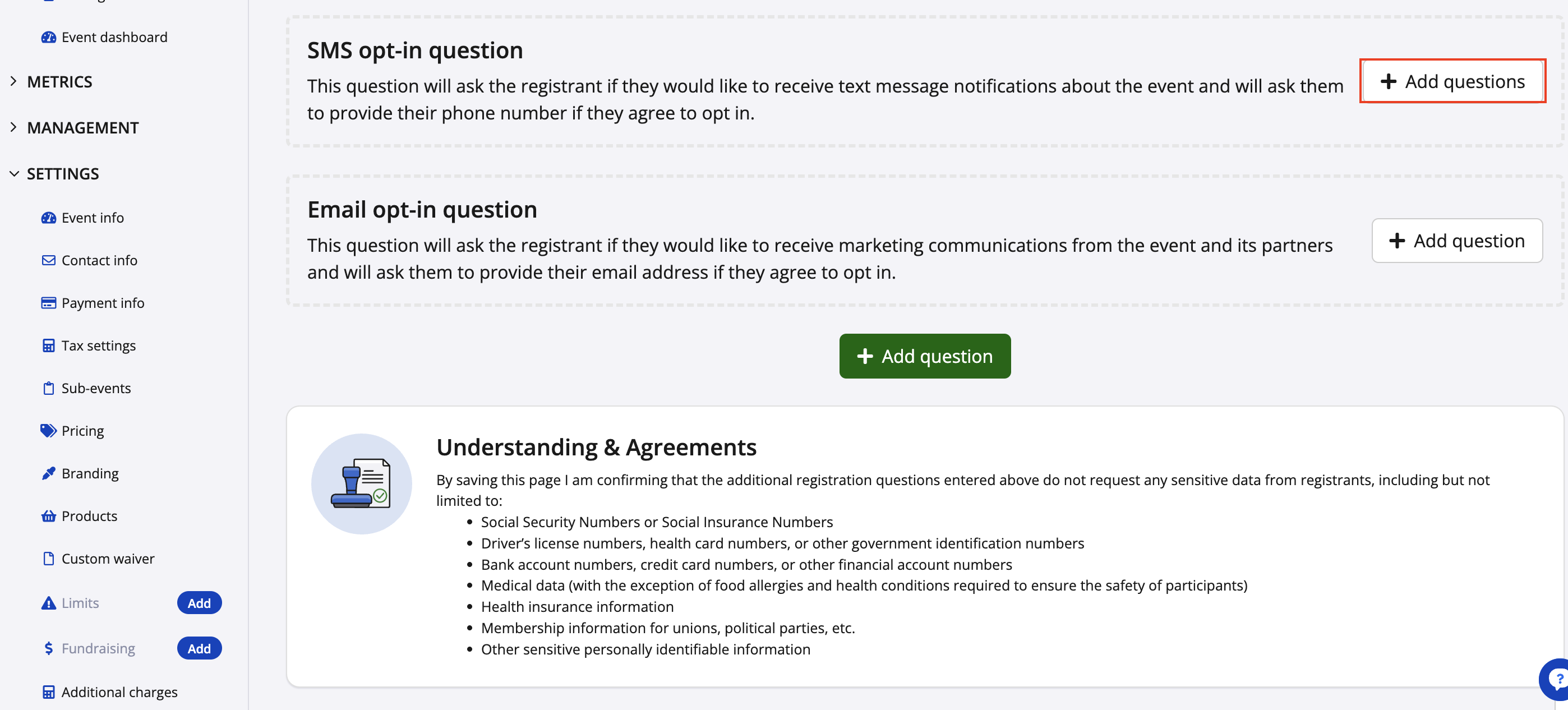
Your question will then be created and added into the registration flow:
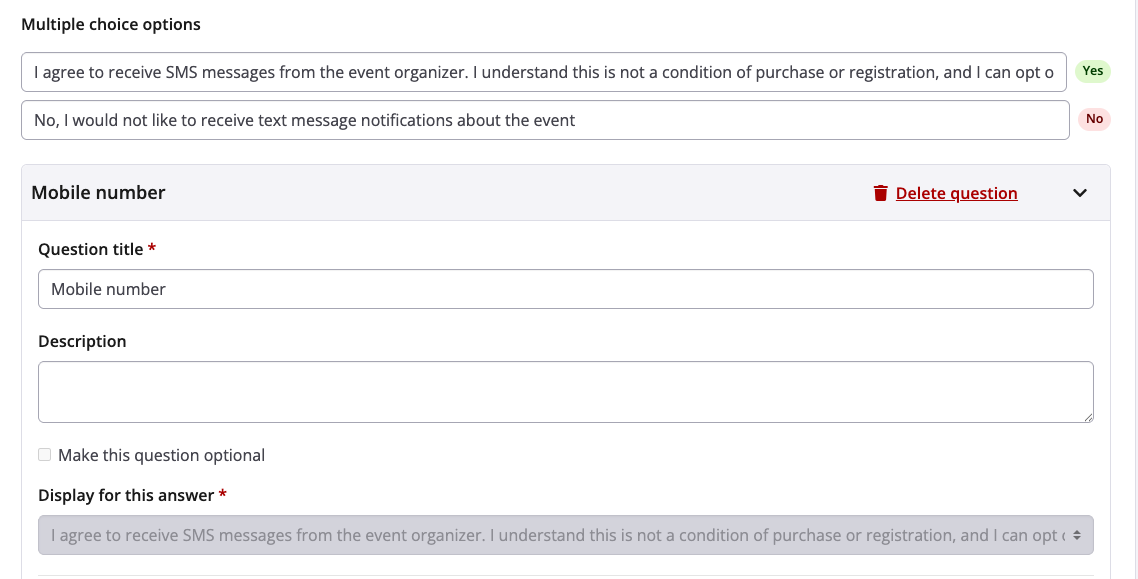

**Collecting subscribers outside of registration:**
1\. Log in to the **[Timer Dashboard](https://timer.raceroster.com/)**
2\. Select **Messages** from the left hand sidebar and choose **Manage SMS Campaigns**
****
5\. Click **Manage campaigns** for the required event
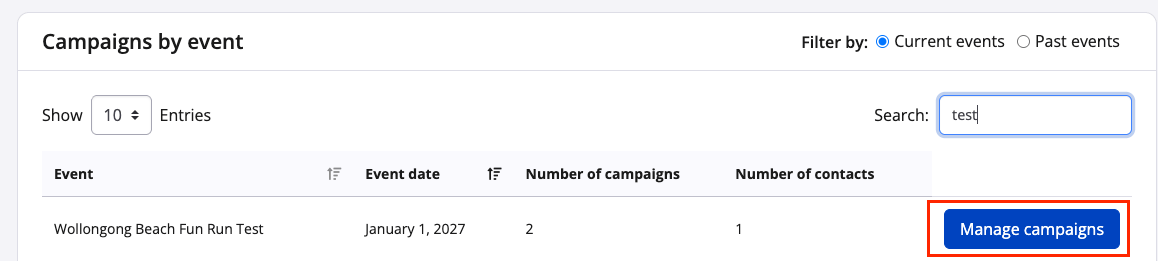
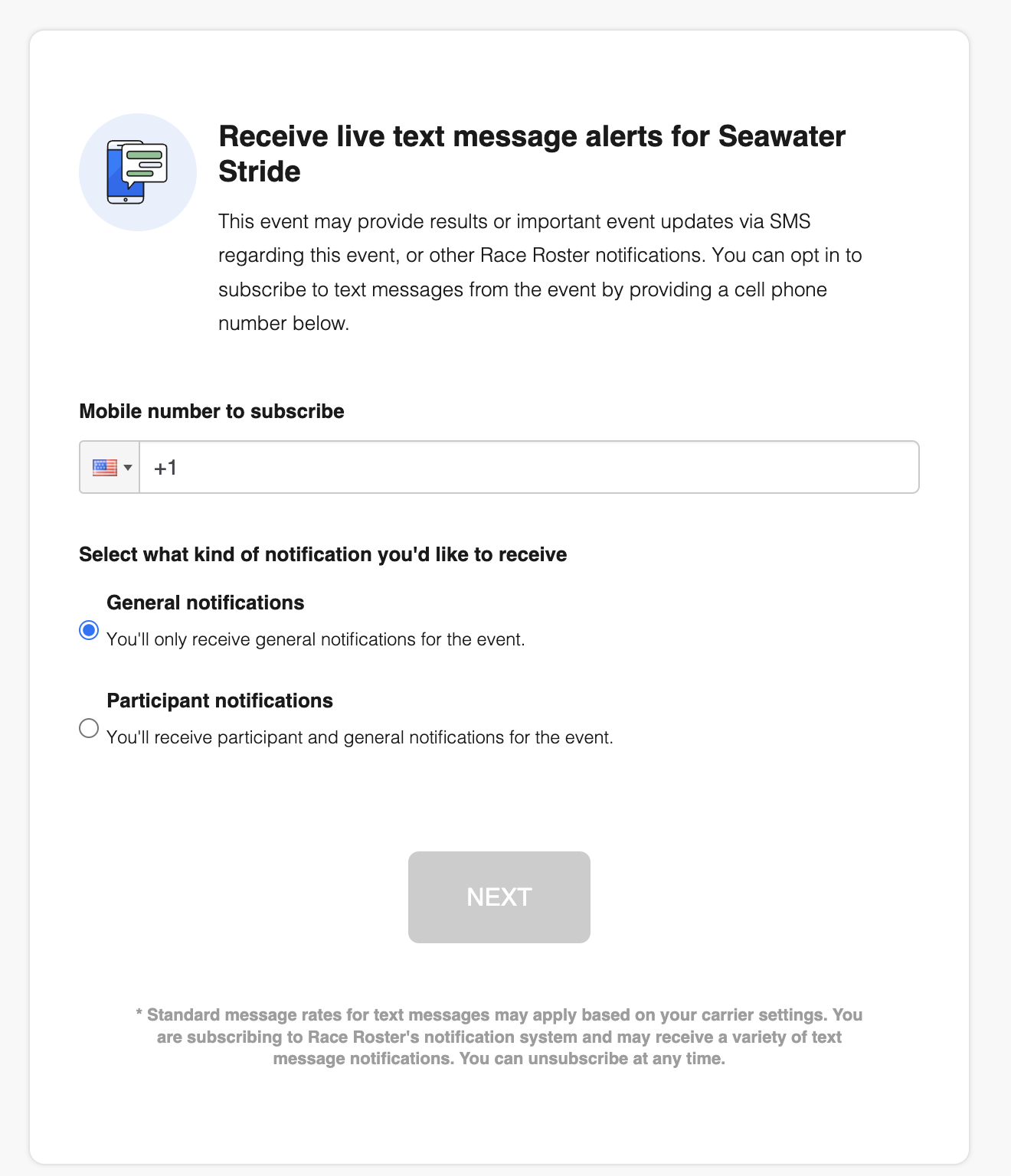
6\. Click on the arrow to the right of the **SMS opt-in settings** to find the sharable **SMS opt-in link** and paste it in a location where participants can sign up for text message notifications. The link can be added event details sidebar which will navigate visitors to the SMS opt-in pag
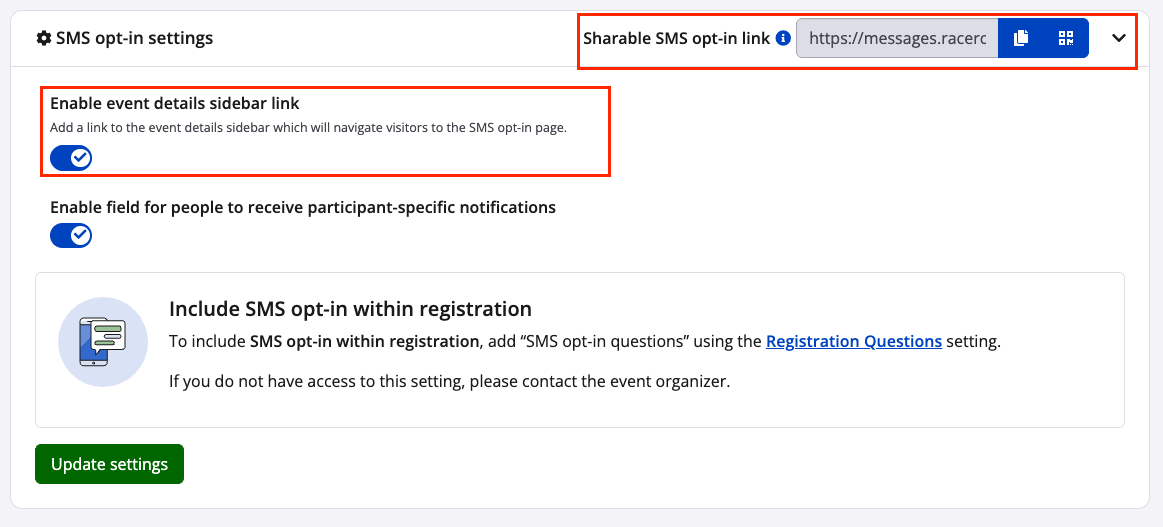
The form to collect subscribers looks like this:
- [Event Organizers and Race Directors](https://help.raceroster.com/en-us/knowledge-base/event-organizers-and-race-directors?hsLang=en-us#main-content)
- [Participant Management](https://help.raceroster.com/en-us/knowledge-base/event-organizers-and-race-directors?hsLang=en-us#participant-management)
- [Financials](https://help.raceroster.com/en-us/knowledge-base/event-organizers-and-race-directors?hsLang=en-us#financials)
- [Marketing & Promotions](https://help.raceroster.com/en-us/knowledge-base/event-organizers-and-race-directors?hsLang=en-us#marketing-promotions)
- [Email Campaigns, MailChimp Integration](https://help.raceroster.com/en-us/knowledge-base/event-organizers-and-race-directors?hsLang=en-us#email-campaigns-mailchimp-integration)
- [Products](https://help.raceroster.com/en-us/knowledge-base/event-organizers-and-race-directors?hsLang=en-us#products)
- [Team Management and Settings](https://help.raceroster.com/en-us/knowledge-base/event-organizers-and-race-directors?hsLang=en-us#team-management-and-settings)
- [Onsite App](https://help.raceroster.com/en-us/knowledge-base/event-organizers-and-race-directors?hsLang=en-us#onsite-app)
- [Registration Questions](https://help.raceroster.com/en-us/knowledge-base/event-organizers-and-race-directors?hsLang=en-us#registration-questions)
- [Fundraising Settings and Receipts](https://help.raceroster.com/en-us/knowledge-base/event-organizers-and-race-directors?hsLang=en-us#fundraising-settings-and-receipts)
- [Promo Codes, Discounts, and Gifting Codes](https://help.raceroster.com/en-us/knowledge-base/event-organizers-and-race-directors?hsLang=en-us#promo-codes-discounts-and-gifting-codes)
- [Virtual](https://help.raceroster.com/en-us/knowledge-base/event-organizers-and-race-directors?hsLang=en-us#virtual)
- [Results](https://help.raceroster.com/en-us/knowledge-base/event-organizers-and-race-directors?hsLang=en-us#results)
- [Access codes](https://help.raceroster.com/en-us/knowledge-base/event-organizers-and-race-directors?hsLang=en-us#access-codes)
- [Director Access and Settings](https://help.raceroster.com/en-us/knowledge-base/event-organizers-and-race-directors?hsLang=en-us#director-access-and-settings)
- [Pricing](https://help.raceroster.com/en-us/knowledge-base/event-organizers-and-race-directors?hsLang=en-us#pricing)
- [Event Page Settings](https://help.raceroster.com/en-us/knowledge-base/event-organizers-and-race-directors?hsLang=en-us#event-page-settings)
- [Your Dashboard](https://help.raceroster.com/en-us/knowledge-base/event-organizers-and-race-directors?hsLang=en-us#your-dashboard)
- [Sub-events](https://help.raceroster.com/en-us/knowledge-base/event-organizers-and-race-directors?hsLang=en-us#sub-events)
- [Other FAQs](https://help.raceroster.com/en-us/knowledge-base/event-organizers-and-race-directors?hsLang=en-us#other-faqs)
- [Volunteers](https://help.raceroster.com/en-us/knowledge-base/event-organizers-and-race-directors?hsLang=en-us#volunteers)
- [Create, Edit or Take Your Event Live](https://help.raceroster.com/en-us/knowledge-base/event-organizers-and-race-directors?hsLang=en-us#create-edit-or-take-your-event-live)
- [Waivers](https://help.raceroster.com/en-us/knowledge-base/event-organizers-and-race-directors?hsLang=en-us#waivers)
- [Reports](https://help.raceroster.com/en-us/knowledge-base/event-organizers-and-race-directors?hsLang=en-us#reports)
- [Participants and Fundraisers](https://help.raceroster.com/en-us/knowledge-base/participants-and-fundraisers?hsLang=en-us#main-content)
- [Participant FAQs](https://help.raceroster.com/en-us/knowledge-base/participants-and-fundraisers?hsLang=en-us#participant-faqs)
- [Fundraising](https://help.raceroster.com/en-us/knowledge-base/participants-and-fundraisers?hsLang=en-us#fundraising)
- [Gift Registrations](https://help.raceroster.com/en-us/knowledge-base/participants-and-fundraisers?hsLang=en-us#gift-registrations)
- [Sign In and Manage Registration](https://help.raceroster.com/en-us/knowledge-base/participants-and-fundraisers?hsLang=en-us#sign-in-and-manage-registration)
- [Transfer Registration](https://help.raceroster.com/en-us/knowledge-base/participants-and-fundraisers?hsLang=en-us#transfer-registration)
- [Access Codes](https://help.raceroster.com/en-us/knowledge-base/participants-and-fundraisers?hsLang=en-us#access-codes)
- [Teams](https://help.raceroster.com/en-us/knowledge-base/participants-and-fundraisers?hsLang=en-us#teams)
- [Security & Compliance](https://help.raceroster.com/en-us/knowledge-base/participants-and-fundraisers?hsLang=en-us#security-compliance)
- [Promo Codes](https://help.raceroster.com/en-us/knowledge-base/participants-and-fundraisers?hsLang=en-us#promo-codes)
- [Race Roster CRM](https://help.raceroster.com/en-us/knowledge-base/race-roster-crm?hsLang=en-us#main-content)
- [Organizations](https://help.raceroster.com/en-us/knowledge-base/race-roster-crm?hsLang=en-us#organizations)
- [Contact Management and Validation Lists](https://help.raceroster.com/en-us/knowledge-base/race-roster-crm?hsLang=en-us#contact-management-and-validation-lists)
- [Reporting](https://help.raceroster.com/en-us/knowledge-base/race-roster-crm?hsLang=en-us#reporting)
- [Events and Event Groups](https://help.raceroster.com/en-us/knowledge-base/race-roster-crm?hsLang=en-us#events-and-event-groups)
- [Campaigns and Marketing](https://help.raceroster.com/en-us/knowledge-base/race-roster-crm?hsLang=en-us#campaigns-and-marketing)
- [Non-profit Organizations](https://help.raceroster.com/en-us/knowledge-base/race-roster-crm?hsLang=en-us#non-profit-organizations)
- [Fundraising Coordinators](https://help.raceroster.com/en-us/knowledge-base/fundraising-coordinators?hsLang=en-us#main-content)
- [Resources](https://help.raceroster.com/en-us/knowledge-base/fundraising-coordinators?hsLang=en-us#resources)
- [Participant and Team Fundraising](https://help.raceroster.com/en-us/knowledge-base/fundraising-coordinators?hsLang=en-us#participant-and-team-fundraising)
- [Reporting](https://help.raceroster.com/en-us/knowledge-base/fundraising-coordinators?hsLang=en-us#reporting)
- [Timers](https://help.raceroster.com/en-us/knowledge-base/timers?hsLang=en-us#main-content)
- [Account settings](https://help.raceroster.com/en-us/knowledge-base/timers?hsLang=en-us#account-settings)
- [Results](https://help.raceroster.com/en-us/knowledge-base/timers?hsLang=en-us#results)
- [Timing Tools](https://help.raceroster.com/en-us/knowledge-base/timers?hsLang=en-us#timing-tools)
- [Bib Assignment](https://help.raceroster.com/en-us/knowledge-base/timers?hsLang=en-us#bib-assignment)
- [Participant Data and Reports](https://help.raceroster.com/en-us/knowledge-base/timers?hsLang=en-us#participant-data-and-reports)
- [The ASICS Runkeeper™ app](https://help.raceroster.com/en-us/knowledge-base/the-asics-runkeeper-app?hsLang=en-us#main-content)
- [The ASICS Runkeeper™ app](https://help.raceroster.com/en-us/knowledge-base/the-asics-runkeeper-app?hsLang=en-us#the-asics-runkeeper-app)
[](https://raceroster.com)
Copyright © 2026, Race Roster