---
title: Understanding payouts and reconciliation
description: Learn how Race Roster payouts work, when funds are received, and how to reconcile payouts using FMRS financial reports, payout statements, and reporting tools.
---
[Skip to content](https://help.raceroster.com/en-us/knowledge-base/how-do-i-find-the-event-payout-/-remittance-reports-0#main-content)
[Submit a knowledge article idea](https://help.raceroster.com/en-us/knowledge-base/kb-tickets/new?hsLang=en-us)

Open main navigation
Close main navigation
- [Submit a knowledge article idea](https://help.raceroster.com/en-us/knowledge-base/kb-tickets/new)
How can we help you?
- There are no suggestions because the search field is empty.
1. [Race Roster Knowledge Base](https://help.raceroster.com/en-us/knowledge-base?hsLang=en-us)
2. [Event Organizers and Race Directors](https://help.raceroster.com/en-us/knowledge-base/event-organizers-and-race-directors?hsLang=en-us)
3. [Financials](https://help.raceroster.com/en-us/knowledge-base/event-organizers-and-race-directors?hsLang=en-us#financials)
August 13, 2026
# Understanding payouts and reconciliation
This article outlines how payouts work, when funds are received, and how Event Organisers can reconcile their payouts using Race Roster’s new financial reporting tools.
Race Roster payouts are processed automatically based on the event setup, payment profile, and payout schedule.
For events created on or after April 1, 2026, payouts are managed through the newly released Financial Management and Reporting System (FMRS), providing full visibility into revenue, deductions, and adjustments.
Each payout includes a detailed statement showing exactly how the final amount was calculated.
---
### Event Payout Report
1\. Login to the [dashboard](https://hubspot.raceroster.com/en-us/knowledge-base/signing-in-to-race-roster-and-accessing-dashboards?hsLang=en-us) as an **Event Organizer**.
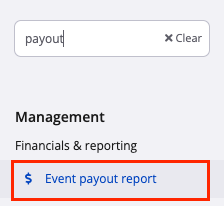
2\. Navigate to the search box in the top left of the screen, search for and select **Event payout report.** Alternatively, go to **Management \> Financials & Reporting** and select **Event payout report** from the drop-down menu.
3\. The **Event payouts** page shows a list of financial payouts for the event.
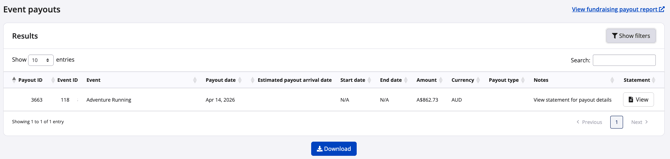
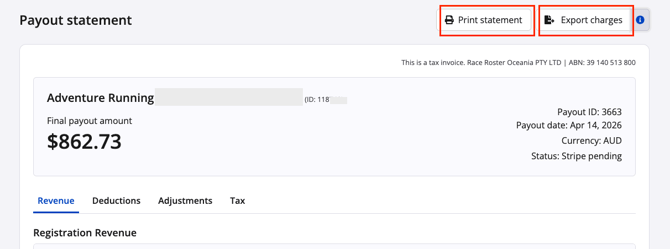
4\. Click **View** under the statement column and linked statement will open in a new window. The report can be printed to pdf by clicking **Print Statement**
5\. Click **Export charges** for a detailed csv of all charge and adjustment data for the report.
---
### Reconciling a payout
A payout consists of four components:
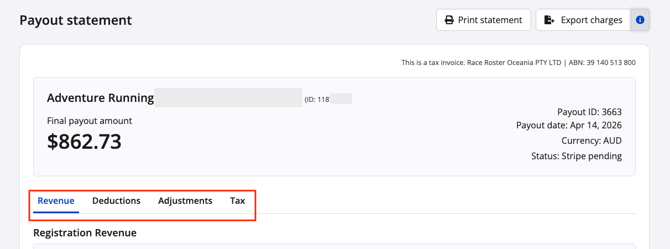
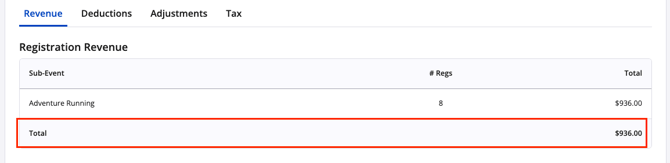
1\) (Gross) Revenue: Registrations, products, additional charges
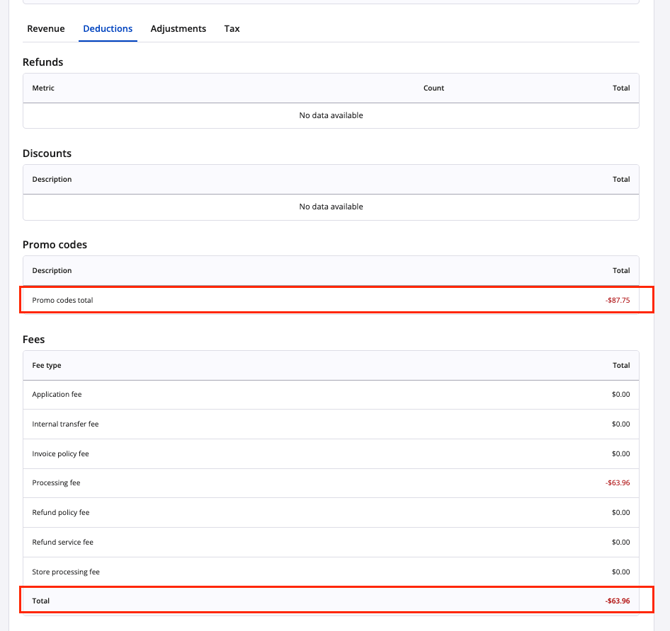
2\) Deductions: Processing fees, discounts, and promoter earnings
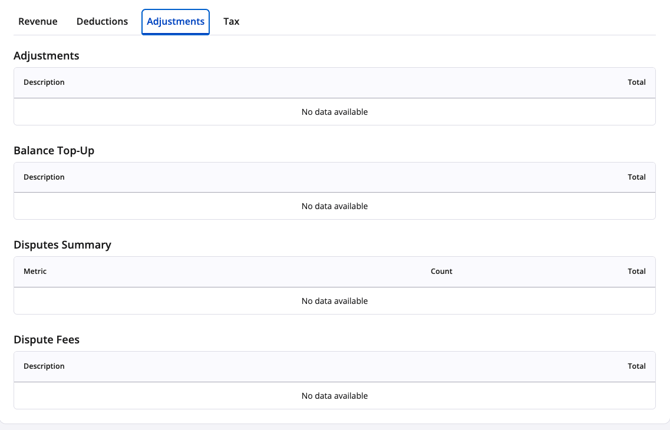
3\) Adjustments: Balance top ups, disputes and dispute fees, manual credits or debits
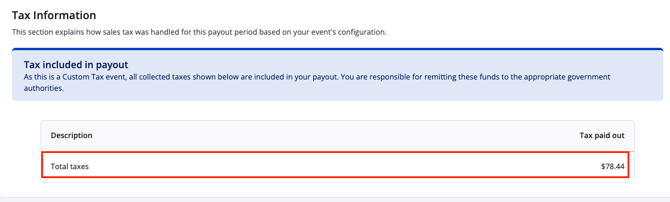
4\) Tax: This section is dependent on your event's configuration
The **Final payout amount** is calculated as follows:
Payout = Revenue + Deductions + Adjustments + Tax
ie $862.73 (Payout) = $936 (Revenue) + -$87.75 (promo) + -$63.96 (fees) + $78.44 (tax)
To reconcile a payout using the new FMRS reports:
1. Filter the **Charges report** by the Payout ID
2. Filter the **Adjustments and Fees report** by the same Payout ID
3. Apply the formula: Total Charges − Total Adjustments and Fees.
This will align with the payout statement. Race Roster has already combined the two for ease of use. Click **Export charges** in the top right corner of the **payout statement** for a detailed **payout charges breakdown report** of all charge and adjustment data.
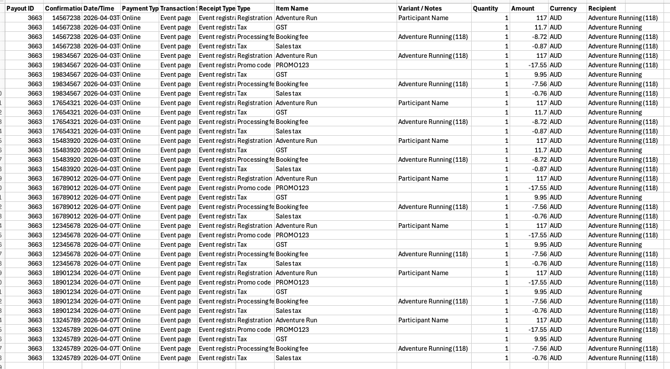
By manually adding column K the sum reflects the formula: **Payout = Revenue + Deductions + Adjustments + Tax**


---
### Payout FAQs
1\) **When will I get paid out?** Not all transactions are paid out immediately. To be included in a payout, funds must meet the following timing thresholds:
- Registrations, products, fees: must be earned more than 7 days before payout
- Refunds and promoter earnings: must be applied more than 2 days before payout
- Adjustments and dispute fees: must be applied more than 1 day before payout
This ensures funds are settled before being paid out.
2\) **Why haven't I received my payout?** If you haven’t received a payout and meet the criteria outlined in the question above, check the following:
- Your event is not on a payment hold
- Your payment profile is approved
- All Stripe details are submitted and verified
- Your registration open date is in the past
- Your event status is Live or Private (not Draft or Demo)
If all of the above are correct and no payout is visible within 24 to 48 hours of the expected date, contact support.
3\) **Why is my payout less than my total revenue?** Your payout will usually be lower than your total revenue because:
- Fees are deducted
- Refunds and disputes are removed
- Only eligible (settled) funds are included
To understand the difference, use the financial reports to reconcile your payout.
4\) **Why does my payout statement look different?** Race Roster introduced a new payouts system on April 1, 2026.
- Events created before this date use the legacy system
- Events created after this date use the new FMRS system
You cannot switch an existing event to the new system once payouts have begun.
5) **What happens if my payout is returned?** A returned payout usually means there is an issue with your banking details.
To resolve:
- Confirm your bank details on your payment profile are correct
- Contact director@raceroster.com (CAN/USA) or director@raceroster.com.au (AUS/NZ/SEA) if bank details need to be updated. Once updated, the payout can be reissued.
6\) **Can I request a custom payout schedule?** Yes, but this requires manual coordination with Race Roster.
- Weekly payouts are the standard and recommended setup
- Daily or twice-weekly payouts are not available
- Custom schedules must be approved and arranged through support
---
For more information on **Understanding Financial Reports in Race Roster** click [HERE](https://help.raceroster.com/en-us/knowledge-base/how-do-i-run-financial-transaction-reports-0?hsLang=en-us)
- [Event Organizers and Race Directors](https://help.raceroster.com/en-us/knowledge-base/event-organizers-and-race-directors?hsLang=en-us#main-content)
- [Participant Management](https://help.raceroster.com/en-us/knowledge-base/event-organizers-and-race-directors?hsLang=en-us#participant-management)
- [Financials](https://help.raceroster.com/en-us/knowledge-base/event-organizers-and-race-directors?hsLang=en-us#financials)
- [Marketing & Promotions](https://help.raceroster.com/en-us/knowledge-base/event-organizers-and-race-directors?hsLang=en-us#marketing-promotions)
- [Email Campaigns, MailChimp Integration](https://help.raceroster.com/en-us/knowledge-base/event-organizers-and-race-directors?hsLang=en-us#email-campaigns-mailchimp-integration)
- [Products](https://help.raceroster.com/en-us/knowledge-base/event-organizers-and-race-directors?hsLang=en-us#products)
- [Team Management and Settings](https://help.raceroster.com/en-us/knowledge-base/event-organizers-and-race-directors?hsLang=en-us#team-management-and-settings)
- [Onsite App](https://help.raceroster.com/en-us/knowledge-base/event-organizers-and-race-directors?hsLang=en-us#onsite-app)
- [Registration Questions](https://help.raceroster.com/en-us/knowledge-base/event-organizers-and-race-directors?hsLang=en-us#registration-questions)
- [Fundraising Settings and Receipts](https://help.raceroster.com/en-us/knowledge-base/event-organizers-and-race-directors?hsLang=en-us#fundraising-settings-and-receipts)
- [Promo Codes, Discounts, and Gifting Codes](https://help.raceroster.com/en-us/knowledge-base/event-organizers-and-race-directors?hsLang=en-us#promo-codes-discounts-and-gifting-codes)
- [Virtual](https://help.raceroster.com/en-us/knowledge-base/event-organizers-and-race-directors?hsLang=en-us#virtual)
- [Results](https://help.raceroster.com/en-us/knowledge-base/event-organizers-and-race-directors?hsLang=en-us#results)
- [Access codes](https://help.raceroster.com/en-us/knowledge-base/event-organizers-and-race-directors?hsLang=en-us#access-codes)
- [Director Access and Settings](https://help.raceroster.com/en-us/knowledge-base/event-organizers-and-race-directors?hsLang=en-us#director-access-and-settings)
- [Pricing](https://help.raceroster.com/en-us/knowledge-base/event-organizers-and-race-directors?hsLang=en-us#pricing)
- [Event Page Settings](https://help.raceroster.com/en-us/knowledge-base/event-organizers-and-race-directors?hsLang=en-us#event-page-settings)
- [Your Dashboard](https://help.raceroster.com/en-us/knowledge-base/event-organizers-and-race-directors?hsLang=en-us#your-dashboard)
- [Sub-events](https://help.raceroster.com/en-us/knowledge-base/event-organizers-and-race-directors?hsLang=en-us#sub-events)
- [Other FAQs](https://help.raceroster.com/en-us/knowledge-base/event-organizers-and-race-directors?hsLang=en-us#other-faqs)
- [Volunteers](https://help.raceroster.com/en-us/knowledge-base/event-organizers-and-race-directors?hsLang=en-us#volunteers)
- [Create, Edit or Take Your Event Live](https://help.raceroster.com/en-us/knowledge-base/event-organizers-and-race-directors?hsLang=en-us#create-edit-or-take-your-event-live)
- [Waivers](https://help.raceroster.com/en-us/knowledge-base/event-organizers-and-race-directors?hsLang=en-us#waivers)
- [Reports](https://help.raceroster.com/en-us/knowledge-base/event-organizers-and-race-directors?hsLang=en-us#reports)
- [Participants and Fundraisers](https://help.raceroster.com/en-us/knowledge-base/participants-and-fundraisers?hsLang=en-us#main-content)
- [Participant FAQs](https://help.raceroster.com/en-us/knowledge-base/participants-and-fundraisers?hsLang=en-us#participant-faqs)
- [Fundraising](https://help.raceroster.com/en-us/knowledge-base/participants-and-fundraisers?hsLang=en-us#fundraising)
- [Gift Registrations](https://help.raceroster.com/en-us/knowledge-base/participants-and-fundraisers?hsLang=en-us#gift-registrations)
- [Sign In and Manage Registration](https://help.raceroster.com/en-us/knowledge-base/participants-and-fundraisers?hsLang=en-us#sign-in-and-manage-registration)
- [Transfer Registration](https://help.raceroster.com/en-us/knowledge-base/participants-and-fundraisers?hsLang=en-us#transfer-registration)
- [Access Codes](https://help.raceroster.com/en-us/knowledge-base/participants-and-fundraisers?hsLang=en-us#access-codes)
- [Teams](https://help.raceroster.com/en-us/knowledge-base/participants-and-fundraisers?hsLang=en-us#teams)
- [Security & Compliance](https://help.raceroster.com/en-us/knowledge-base/participants-and-fundraisers?hsLang=en-us#security-compliance)
- [Promo Codes](https://help.raceroster.com/en-us/knowledge-base/participants-and-fundraisers?hsLang=en-us#promo-codes)
- [Race Roster CRM](https://help.raceroster.com/en-us/knowledge-base/race-roster-crm?hsLang=en-us#main-content)
- [Organizations](https://help.raceroster.com/en-us/knowledge-base/race-roster-crm?hsLang=en-us#organizations)
- [Contact Management and Validation Lists](https://help.raceroster.com/en-us/knowledge-base/race-roster-crm?hsLang=en-us#contact-management-and-validation-lists)
- [Reporting](https://help.raceroster.com/en-us/knowledge-base/race-roster-crm?hsLang=en-us#reporting)
- [Events and Event Groups](https://help.raceroster.com/en-us/knowledge-base/race-roster-crm?hsLang=en-us#events-and-event-groups)
- [Campaigns and Marketing](https://help.raceroster.com/en-us/knowledge-base/race-roster-crm?hsLang=en-us#campaigns-and-marketing)
- [Non-profit Organizations](https://help.raceroster.com/en-us/knowledge-base/race-roster-crm?hsLang=en-us#non-profit-organizations)
- [Fundraising Coordinators](https://help.raceroster.com/en-us/knowledge-base/fundraising-coordinators?hsLang=en-us#main-content)
- [Resources](https://help.raceroster.com/en-us/knowledge-base/fundraising-coordinators?hsLang=en-us#resources)
- [Participant and Team Fundraising](https://help.raceroster.com/en-us/knowledge-base/fundraising-coordinators?hsLang=en-us#participant-and-team-fundraising)
- [Reporting](https://help.raceroster.com/en-us/knowledge-base/fundraising-coordinators?hsLang=en-us#reporting)
- [Timers](https://help.raceroster.com/en-us/knowledge-base/timers?hsLang=en-us#main-content)
- [Account settings](https://help.raceroster.com/en-us/knowledge-base/timers?hsLang=en-us#account-settings)
- [Results](https://help.raceroster.com/en-us/knowledge-base/timers?hsLang=en-us#results)
- [Timing Tools](https://help.raceroster.com/en-us/knowledge-base/timers?hsLang=en-us#timing-tools)
- [Bib Assignment](https://help.raceroster.com/en-us/knowledge-base/timers?hsLang=en-us#bib-assignment)
- [Participant Data and Reports](https://help.raceroster.com/en-us/knowledge-base/timers?hsLang=en-us#participant-data-and-reports)
- [The ASICS Runkeeper™ app](https://help.raceroster.com/en-us/knowledge-base/the-asics-runkeeper-app?hsLang=en-us#main-content)
- [The ASICS Runkeeper™ app](https://help.raceroster.com/en-us/knowledge-base/the-asics-runkeeper-app?hsLang=en-us#the-asics-runkeeper-app)
[](https://raceroster.com)
Copyright © 2026, Race Roster