---
title: How do discounts work during registration?
description: Learn how discounts work on Race Roster, including promo codes, age, team, and validation discounts, and how they can be combined. Understand eligibility, application order, and what to do if a discount doesn’t apply at checkout.
---
[Skip to content](https://help.raceroster.com/en-us/knowledge-base/how-do-discounts-work-during-registration#main-content)
[Submit a knowledge article idea](https://help.raceroster.com/en-us/knowledge-base/kb-tickets/new?hsLang=en-us)

Open main navigation
Close main navigation
- [Submit a knowledge article idea](https://help.raceroster.com/en-us/knowledge-base/kb-tickets/new)
How can we help you?
- There are no suggestions because the search field is empty.
1. [Race Roster Knowledge Base](https://help.raceroster.com/en-us/knowledge-base?hsLang=en-us)
2. [Event Organizers and Race Directors](https://help.raceroster.com/en-us/knowledge-base/event-organizers-and-race-directors?hsLang=en-us)
3. [Promo Codes, Discounts, and Gifting Codes](https://help.raceroster.com/en-us/knowledge-base/event-organizers-and-race-directors?hsLang=en-us#promo-codes-discounts-and-gifting-codes)
March 29, 2026
# How do discounts work during registration?
When registering for an event on Race Roster, you may be eligible for one or more discounts. These discounts are applied automatically based on your details, or manually when you enter a promo code during checkout.
This article explains the different types of discounts you may see as a participant, which discounts can be combined, and the order in which they are applied so you know exactly how your final registration price is calculated.
### Types of Discounts You May Encounter
#### **Promo Codes**
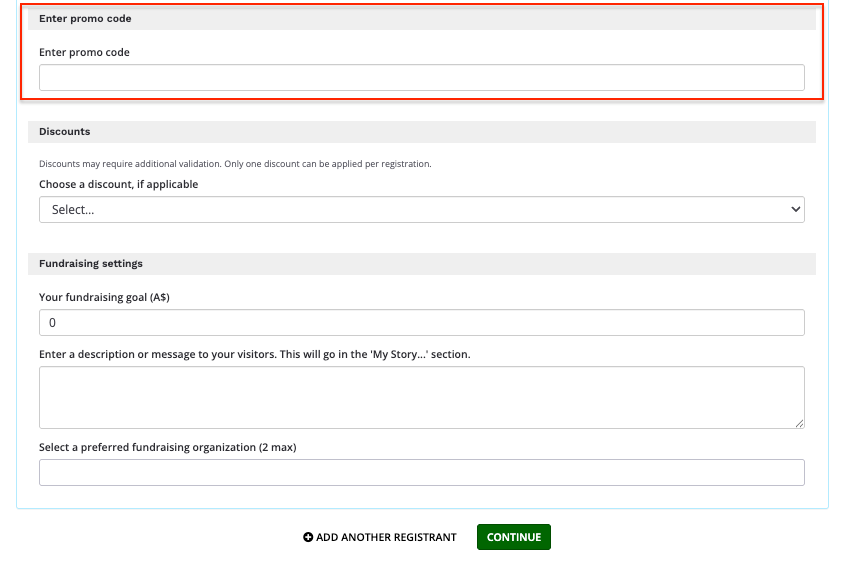
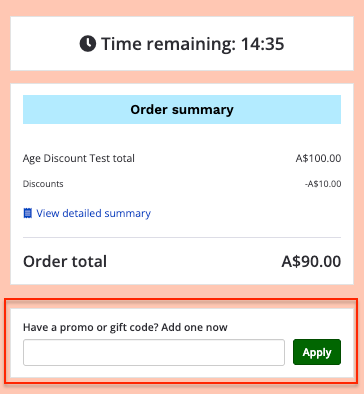
Promo codes are entered manually during registration. You can apply a promo code either at the bottom of the first registration page or on the final page of the registration process in the Checkout tab. Promo codes are often shared by event organizers for special promotions, or partner offers.
*Key things to know:*
- You can only use one promo code per person per registration. If you are registering more than one participant, you can enter a separate promo code for each person after selecting Add Another Registrant. Multiple promo codes cannot be applied to a single registration on the Checkout page.
- Promo codes can be combined with other discount types, as long as they are valid for your registration
The following screenshot shows the first page of the registration process where a participant can input a promo code.
The following screenshot shows the the final page of the registration process (the Checkout tab) where a participant can input a promo code.
#### **Age Discounts**
Age discounts are applied automatically based on the date of birth entered during registration. If you meet the age criteria set by the event organizer, the discount will be applied automatically without any additional action required.
*Key things to know:*
- Age discounts are applied automatically
- They are calculated as a discount from the full registration price
- Age discounts can be combined with team discounts, general discounts, and promo codes
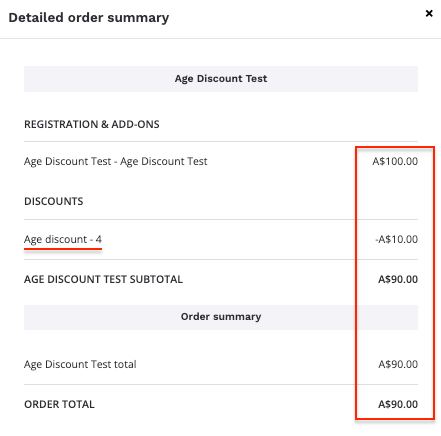
The following screenshot shows an original registration cost of $100 with a 10% age discount applied, resulting in a discounted price of $90.
#### **Team and Group Discounts**
Some events offer discounts when you register as part of a team or group. These discounts are applied when you join or create a team/group that qualifies for a discount as configured by the event organizer.
*Key things to know:*
- Team and group discounts are applied automatically once you are part of an eligible team/group
- Team and group discounts are calculated after any age discount has already been applied
- Team and group discounts can be combined with age discounts, general discounts, and promo codes
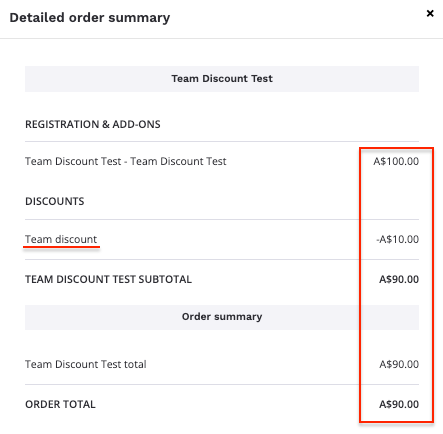
The following screenshot shows an original registration cost of $100 with a 10% team discount applied, resulting in a discounted price of $90.
#### **General Discounts (Validation List Discounts)**
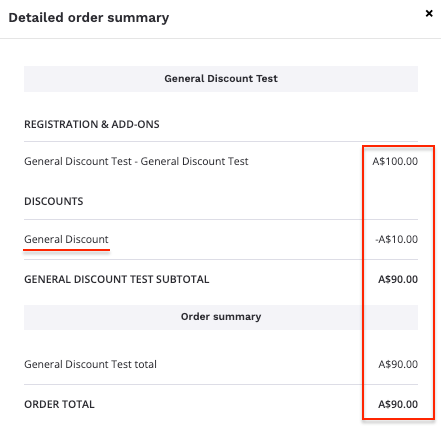
General discounts are applied when your registration details match specific criteria set by the event organizer. This may include entering information such as your full name and/or date of birth.
*Key things to know:*
- General discounts are applied automatically once the required information matches the event’s validation list or within a specific timeframe set by the event organizer
- They can be combined with promo codes, age discounts, and team discounts, if allowed by the event
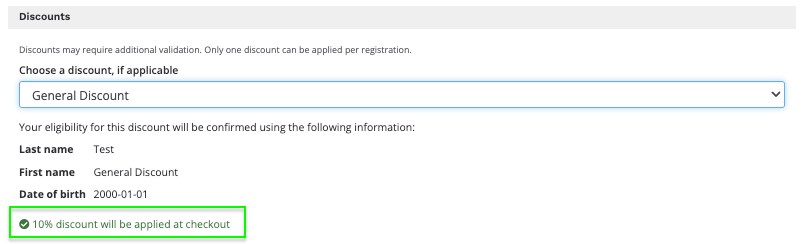
The following screenshot shows a general discount successfully applied after validation against the first name, last name, and date of birth.
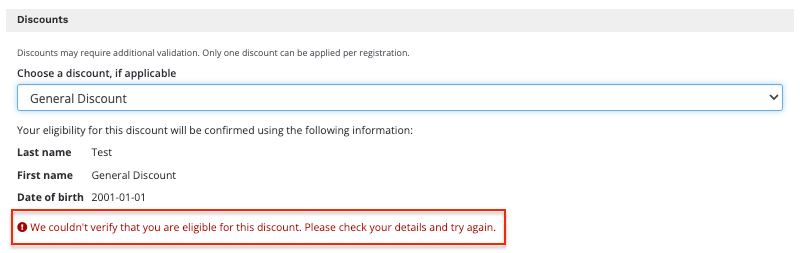
The following screenshot shows an unsuccessfully validated discount which was validated against the first name, last name, and an updated date of birth
#### **Which Discounts Can Be Combined**
Here is a simple breakdown of how discounts work together:
- Promo codes can be combined with age discounts, team discounts, and general discounts
- You can only use one promo code per person, per registration
- Age discounts and team discounts can be applied together
- Multiple automatic discounts may apply if you meet the criteria for each. However, the same type of automatic discount cannot be applied more than once, for example, two age discounts.
If more than one discount applies to your registration, Race Roster will calculate them in a specific order.
#### **Order of Discount Application**
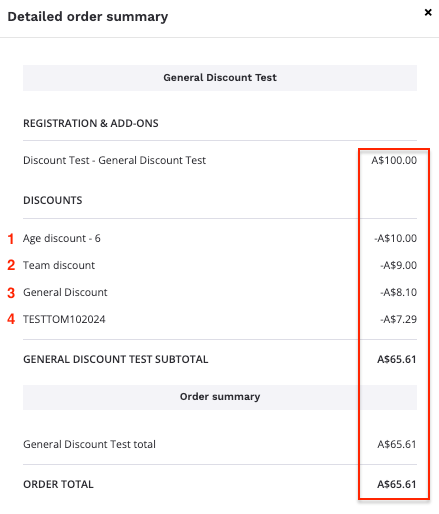
When multiple discounts apply to a single registration, they are applied in the following order:
1. Age discount is applied first to the full registration price
2. Team/group discount is applied next to the remaining balance
3. General discount is applied once your registration details are validated
4. Promo code is applied in conjunction with the above discounts, based on its setup
This ensures each discount is calculated correctly and displayed clearly in your checkout summary.
The following screenshot shows an original registration cost of $100 with multiple discounts applied sequentially. Each 10% discount is applied to the remaining balance after the previous discount, not to the original price. This results in a final discounted price of $65.61.
#### **What to Do If a Discount Does Not Apply**
If you believe a discount should have been applied but do not see it during checkout:
- Confirm that your promo code is valid and entered correctly
- Make sure you have joined the correct team, if applicable
- Double check that your date of birth and other details are entered correctly if selecting a general discount applied to a validation list
- Review any eligibility requirements listed on the event page
If the issue continues, you can contact the event organizer directly for assistance, as they manage discount rules for their event.
#### **Summary**
- Some discounts apply automatically, while others require a promo code
- Multiple discounts can apply to one registration, depending on eligibility
- You can only use one promo code per person, per registration
- Discounts are applied in a set order to calculate your final price
- [Event Organizers and Race Directors](https://help.raceroster.com/en-us/knowledge-base/event-organizers-and-race-directors?hsLang=en-us#main-content)
- [Participant Management](https://help.raceroster.com/en-us/knowledge-base/event-organizers-and-race-directors?hsLang=en-us#participant-management)
- [Financials](https://help.raceroster.com/en-us/knowledge-base/event-organizers-and-race-directors?hsLang=en-us#financials)
- [Marketing & Promotions](https://help.raceroster.com/en-us/knowledge-base/event-organizers-and-race-directors?hsLang=en-us#marketing-promotions)
- [Email Campaigns, MailChimp Integration](https://help.raceroster.com/en-us/knowledge-base/event-organizers-and-race-directors?hsLang=en-us#email-campaigns-mailchimp-integration)
- [Products](https://help.raceroster.com/en-us/knowledge-base/event-organizers-and-race-directors?hsLang=en-us#products)
- [Team Management and Settings](https://help.raceroster.com/en-us/knowledge-base/event-organizers-and-race-directors?hsLang=en-us#team-management-and-settings)
- [Onsite App](https://help.raceroster.com/en-us/knowledge-base/event-organizers-and-race-directors?hsLang=en-us#onsite-app)
- [Registration Questions](https://help.raceroster.com/en-us/knowledge-base/event-organizers-and-race-directors?hsLang=en-us#registration-questions)
- [Fundraising Settings and Receipts](https://help.raceroster.com/en-us/knowledge-base/event-organizers-and-race-directors?hsLang=en-us#fundraising-settings-and-receipts)
- [Promo Codes, Discounts, and Gifting Codes](https://help.raceroster.com/en-us/knowledge-base/event-organizers-and-race-directors?hsLang=en-us#promo-codes-discounts-and-gifting-codes)
- [Virtual](https://help.raceroster.com/en-us/knowledge-base/event-organizers-and-race-directors?hsLang=en-us#virtual)
- [Results](https://help.raceroster.com/en-us/knowledge-base/event-organizers-and-race-directors?hsLang=en-us#results)
- [Access codes](https://help.raceroster.com/en-us/knowledge-base/event-organizers-and-race-directors?hsLang=en-us#access-codes)
- [Director Access and Settings](https://help.raceroster.com/en-us/knowledge-base/event-organizers-and-race-directors?hsLang=en-us#director-access-and-settings)
- [Pricing](https://help.raceroster.com/en-us/knowledge-base/event-organizers-and-race-directors?hsLang=en-us#pricing)
- [Event Page Settings](https://help.raceroster.com/en-us/knowledge-base/event-organizers-and-race-directors?hsLang=en-us#event-page-settings)
- [Your Dashboard](https://help.raceroster.com/en-us/knowledge-base/event-organizers-and-race-directors?hsLang=en-us#your-dashboard)
- [Sub-events](https://help.raceroster.com/en-us/knowledge-base/event-organizers-and-race-directors?hsLang=en-us#sub-events)
- [Other FAQs](https://help.raceroster.com/en-us/knowledge-base/event-organizers-and-race-directors?hsLang=en-us#other-faqs)
- [Volunteers](https://help.raceroster.com/en-us/knowledge-base/event-organizers-and-race-directors?hsLang=en-us#volunteers)
- [Create, Edit or Take Your Event Live](https://help.raceroster.com/en-us/knowledge-base/event-organizers-and-race-directors?hsLang=en-us#create-edit-or-take-your-event-live)
- [Waivers](https://help.raceroster.com/en-us/knowledge-base/event-organizers-and-race-directors?hsLang=en-us#waivers)
- [Reports](https://help.raceroster.com/en-us/knowledge-base/event-organizers-and-race-directors?hsLang=en-us#reports)
- [Participants and Fundraisers](https://help.raceroster.com/en-us/knowledge-base/participants-and-fundraisers?hsLang=en-us#main-content)
- [Participant FAQs](https://help.raceroster.com/en-us/knowledge-base/participants-and-fundraisers?hsLang=en-us#participant-faqs)
- [Fundraising](https://help.raceroster.com/en-us/knowledge-base/participants-and-fundraisers?hsLang=en-us#fundraising)
- [Gift Registrations](https://help.raceroster.com/en-us/knowledge-base/participants-and-fundraisers?hsLang=en-us#gift-registrations)
- [Sign In and Manage Registration](https://help.raceroster.com/en-us/knowledge-base/participants-and-fundraisers?hsLang=en-us#sign-in-and-manage-registration)
- [Transfer Registration](https://help.raceroster.com/en-us/knowledge-base/participants-and-fundraisers?hsLang=en-us#transfer-registration)
- [Access Codes](https://help.raceroster.com/en-us/knowledge-base/participants-and-fundraisers?hsLang=en-us#access-codes)
- [Teams](https://help.raceroster.com/en-us/knowledge-base/participants-and-fundraisers?hsLang=en-us#teams)
- [Security & Compliance](https://help.raceroster.com/en-us/knowledge-base/participants-and-fundraisers?hsLang=en-us#security-compliance)
- [Promo Codes](https://help.raceroster.com/en-us/knowledge-base/participants-and-fundraisers?hsLang=en-us#promo-codes)
- [Race Roster CRM](https://help.raceroster.com/en-us/knowledge-base/race-roster-crm?hsLang=en-us#main-content)
- [Organizations](https://help.raceroster.com/en-us/knowledge-base/race-roster-crm?hsLang=en-us#organizations)
- [Contact Management and Validation Lists](https://help.raceroster.com/en-us/knowledge-base/race-roster-crm?hsLang=en-us#contact-management-and-validation-lists)
- [Reporting](https://help.raceroster.com/en-us/knowledge-base/race-roster-crm?hsLang=en-us#reporting)
- [Events and Event Groups](https://help.raceroster.com/en-us/knowledge-base/race-roster-crm?hsLang=en-us#events-and-event-groups)
- [Campaigns and Marketing](https://help.raceroster.com/en-us/knowledge-base/race-roster-crm?hsLang=en-us#campaigns-and-marketing)
- [Non-profit Organizations](https://help.raceroster.com/en-us/knowledge-base/race-roster-crm?hsLang=en-us#non-profit-organizations)
- [Fundraising Coordinators](https://help.raceroster.com/en-us/knowledge-base/fundraising-coordinators?hsLang=en-us#main-content)
- [Resources](https://help.raceroster.com/en-us/knowledge-base/fundraising-coordinators?hsLang=en-us#resources)
- [Participant and Team Fundraising](https://help.raceroster.com/en-us/knowledge-base/fundraising-coordinators?hsLang=en-us#participant-and-team-fundraising)
- [Reporting](https://help.raceroster.com/en-us/knowledge-base/fundraising-coordinators?hsLang=en-us#reporting)
- [Timers](https://help.raceroster.com/en-us/knowledge-base/timers?hsLang=en-us#main-content)
- [Account settings](https://help.raceroster.com/en-us/knowledge-base/timers?hsLang=en-us#account-settings)
- [Results](https://help.raceroster.com/en-us/knowledge-base/timers?hsLang=en-us#results)
- [Timing Tools](https://help.raceroster.com/en-us/knowledge-base/timers?hsLang=en-us#timing-tools)
- [Bib Assignment](https://help.raceroster.com/en-us/knowledge-base/timers?hsLang=en-us#bib-assignment)
- [Participant Data and Reports](https://help.raceroster.com/en-us/knowledge-base/timers?hsLang=en-us#participant-data-and-reports)
- [The ASICS Runkeeper™ app](https://help.raceroster.com/en-us/knowledge-base/the-asics-runkeeper-app?hsLang=en-us#main-content)
- [The ASICS Runkeeper™ app](https://help.raceroster.com/en-us/knowledge-base/the-asics-runkeeper-app?hsLang=en-us#the-asics-runkeeper-app)
[](https://raceroster.com)
Copyright © 2026, Race Roster